You have the party in voice, everyone's downloaded the same game, and one invite still won't go through. Or it does go through, you queue ranked, and only then do you learn your console duo can't join your PC ladder. That's the gap most crossplay checkmarks hide. A game can let you party up and still split your rank, your chat tools, your aim rules, and your inventory. Cross platform compatibility isn't one yes or no badge. It's a stack of separate promises, and a squad only works when the promise you need is the one the game keeps.
Table of Contents
- What Cross Platform Compatibility Really Covers
- How Matchmaking Builds a Crossplay Pool
- Why Input Method Decides Ranked Fairness
- What Progress Actually Follows Your Account
- Platform Limits That Still Split a Party
- How Major Games Handle Compatibility Differently
- Find a Fair Cross Platform Squad on GamerPlug
What Cross Platform Compatibility Really Covers
You're staring at a failed squad invite. Everyone owns the game, yet one friend can't join. Owning the box, to borrow a board game analogy, isn't the same as entering the same bracket or keeping the same scorecard.
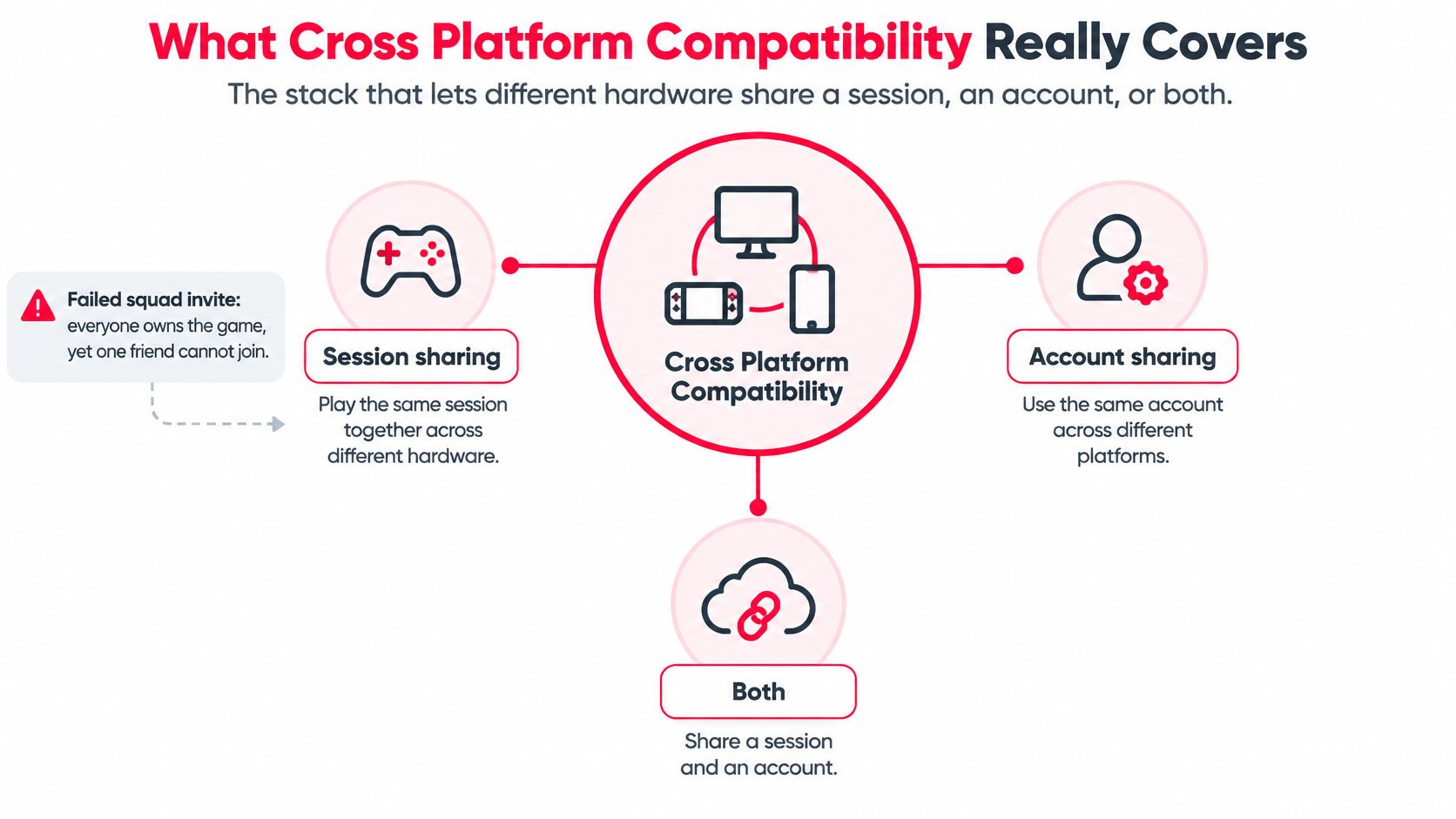
Cross platform compatibility is the stack that lets different hardware share a session, an account, or both. Start with the table, because most confusion comes from answering the wrong question well.
| Layer | What it shares | What it does not guarantee | Question it answers |
|---|---|---|---|
| Crossplay | One lobby or party across supported platforms | Same rank ladder, input pool, or chat tools | Can we queue together? |
| Cross-progression | Linked account level, rank history, and unlocks | Every storefront purchase or friend list | Does my career follow me? |
| Cross-save | Inventory, battle pass, or saves on supported devices | Voice settings, friends, or competitive eligibility | Will my stuff be there? |
| Cross-generation | Last-gen and current-gen consoles in one pool | PC or mobile inclusion | Can old and new consoles play? |
| Input-based matchmaking | Mouse, controller, gyro, or touch grouped for fairness | That every playlist uses the split | Will this lobby feel fair? |
Reading Each Row Once
Crossplay puts platforms in one lobby. It doesn't guarantee one ladder or the same chat tools. Cross-progression carries career stats and achievements across linked accounts, while a storefront purchase can remain restricted to the store that sold it.
Cross-save moves inventory and battle-pass state between supported devices. Cross-generation joins last-gen and current-gen consoles without automatically adding PC or mobile. Input-based matchmaking groups mouse, controller, and touch so an open lobby can still feel competitive.
That layering is hard to build. In the 2025 developer survey of 300 game creators, 72% prioritized cross-play, while 38% identified delivering a consistent user experience across devices as the primary obstacle. Frame rate, controls, progression, and fairness all differ between platforms, so connecting populations is only part of the job.
Mark the single row that matches your question before you touch a setting. If your problem is rank, a crossplay toggle won't fix it.
How Matchmaking Builds a Crossplay Pool
Matchmaking doesn't start by throwing everyone into one big bucket. It walks a queue of checks, and any check can change who you're allowed to face.
The four steps below show that order, from ownership to the pool you finally enter.
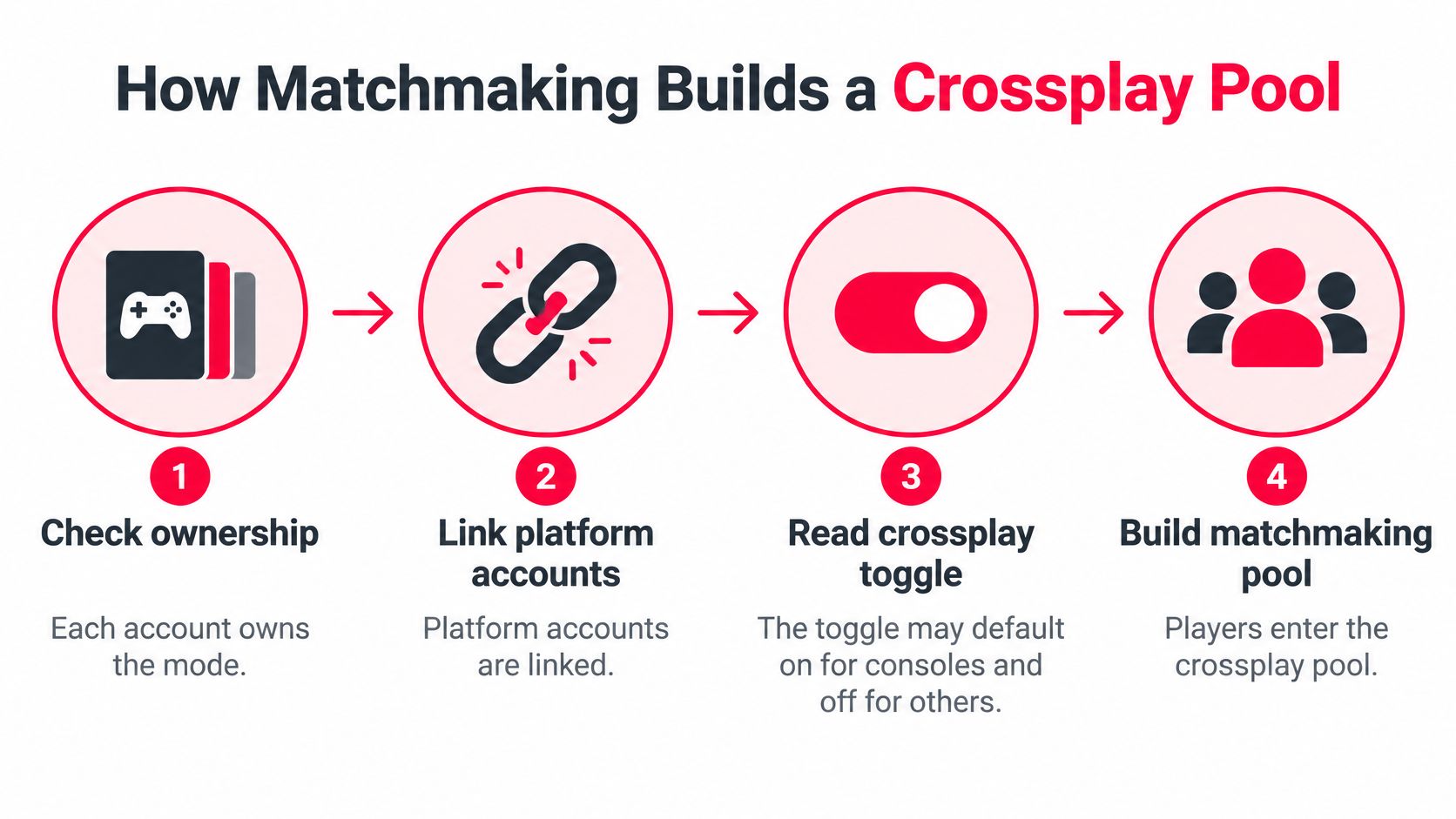
First, the game checks that each account owns the mode and that platform accounts are linked. A friend with the free hub but not the paid playlist, or an unlinked console account, fails here before skill is ever considered.
Next, it reads the crossplay toggle. That toggle may default on for consoles and off, or sit hidden in account settings, on PC. Two players with opposite defaults can both swear they never changed anything, and they're both right.
Then the matchmaker builds a pool from playlist, region, party size, and the mix of platforms in the party. It isn't matching you first and checking rules later. The rules decide which population your skill rating is even allowed to search.
The Strictest Rule Wins
Parties inherit the strictest rule any member brings. A PC player can pull console friends into a PC-rules casual lobby, which feels generous. That same PC player can also block the whole party from a console-only ranked ladder, which doesn't. One member changed the pool for everybody.
That's also why you should separate a visible rank badge from the ladder underneath it. A badge earned in a console pool isn't automatically equal to the same badge in a PC pool, because the population, input mix, and frame-rate mix differ. Skill rating still runs inside whichever pool the rules allow, so a wider pool usually shortens the wait and widens the skill spread you'll meet.
The short clip below walks through that pool-building logic visually, which helps when a party invite succeeds but the ranked queue refuses.
Opt-in versus forced crossplay adds one more wrinkle. Turning crossplay off can restore a familiar pool with familiar inputs. It also shrinks the friend group that can queue with you, and some playlists get thin enough that wait times climb.
Run this check before you queue.
- Playlist rules. Does this specific mode, not just the game, allow your platform mix?
- Pool changer. Does one member's platform move everyone into different rules?
- Ranked offered. Is ranked even offered to this mix, or only casual?
Why Input Method Decides Ranked Fairness
Crossplay on doesn't mean the match is fair. That's the assumption worth dropping before you lose rating to it.
Players usually meet three input families. Mouse and keyboard wins on raw aiming speed and flicks. Controller often gets aim assist that slows the reticle near a target. Touch was never built for the same flick shots, and gyro sits somewhere between stick and mouse on consoles and handhelds.
The edges stack. Higher and more stable frame rates on many PCs mean you see movement sooner. A wider field of view shows a flank a console player can't see yet. As coverage of cross-platform play in 2026 puts the problem, players may be technically able to join the same lobby but still face different competitive conditions when input advantage, aim assist, frame rate, and ranked rules are ignored.
Three Designs Games Actually Use
- Ranked refuses mixed parties. Some ranked playlists restrict crossplay outright, so casual works and ranked doesn't.
- One lobby, split search pools. Others use input-based matchmaking pools, grouping mouse with mouse and controller with controller inside the same game.
- Everything together. Some games allow every input in one pool and leave fairness to the player, which is simple and often miserable for somebody.
Read that practically. A controller player joining a mouse lobby in a tactical shooter isn't having the same match as two controller players in a casual battle royale. Peeks are faster, long angles punish slower aim, and aim assist tuned for close fights won't save a cross-map duel.
Ask three things before you invite someone competitive. What's their input? Do they want same-input teammates only? Does this playlist keep aim assist on for controllers, or strip it in mixed lobbies?
Trade-off in one line: restricting input makes queues longer and friend groups smaller, while ignoring it makes wins feel cheap and losses feel rigged.
Treat input method as a first-class filter alongside platform, not as a footnote. Keyboard and mouse, controller, gyro, touch, or a mixed setup each describe a different match, even on identical hardware.
The question that matters more than the crossplay logo is simple. Will this squad's lobby use the same rules you think you're playing under? If you can't answer that, you aren't ready to queue ranked together.
What Progress Actually Follows Your Account
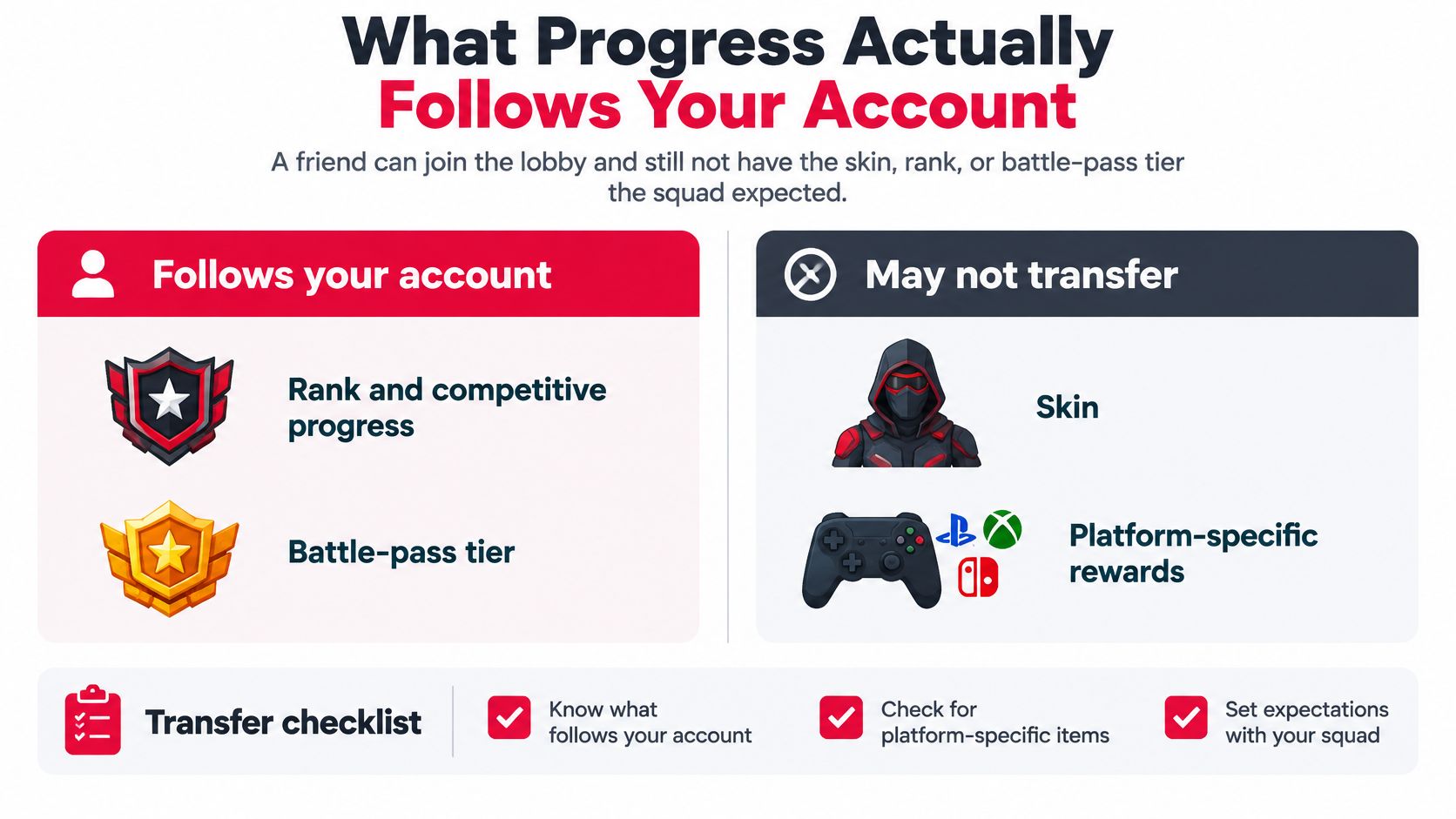
Your friend joins the lobby on a new platform, wearing the default skin. Their rank is gone, their battle-pass tier is back to one, and the cosmetic your squad planned to match is missing. Crossplay brought them into the same lobby. It did not bring all their progress with them.
The comparison below separates what may follow an account from what can stay tied to a platform or storefront.
Run the Transfer Checklist in Order
- Rank and competitive eligibility. Does the ladder recognize you on the new platform?
- Stats. Do career numbers sync, or start fresh?
- Battle-pass progress. Does paid progress carry, or only earned levels?
- Inventory and cosmetics. Are items account-wide or store-bound?
- Real-money purchases. Can currency bought on one store be spent on another?
- Friends list. Are in-game friends shared, or tied to the platform list?
- Voice and chat settings. Do your binds and privacy choices follow?
Progress can be shared on one storefront's version of a game while other storefronts keep separate progress. That can leave one player with more than one career, and only one of those careers may count for a particular event.
The split often comes down to accounts, entitlements, and parental records managed by platform holders and storefronts. A purchase is a receipt held by a store, not a universal key. The game may honor it only where that store's account is linked.
For a squad, the difference shows up before a match. A player who is ranked on console may be unranked on Steam after switching platforms, or may not have the cosmetics the team expects. A tournament roster can look eligible on paper and still fail check-in if the event recognizes a different account ecosystem.
Before anyone switches, record the current platform, the storefront or account ecosystem, and whether the synced rank is the one the event accepts. Link accounts in each game's settings, since linking is handled per title, then check the rank screen on the new platform before the event.
If you cannot name exactly what transfers, assume it does not.
Platform Limits That Still Split a Party
Rainbow Six Siege can let players crossplay while keeping parts of the experience separate. Crossplay defaults differ between PC and consoles, ranked play can place PC and console players in different rank contexts, and console players do not have text chat.
Those limits show up in the tools each platform supports: voice services, parental-safety settings, input methods, and communication features. A game may offer different options across platforms or restrict a feature where the platform does not support it.
Party Failures You'll Recognize
- Restricted chat. Parental settings on a console account can block text or voice chat, leaving a player unable to use the call their PC teammates are typing in.
- Lost invites. An invite sent through a platform's friends list may not reach someone who is connected only through the game.
- Ranked mismatch. A lobby's ranked rules may exclude a player on another platform, even if the same party played casual crossplay together.
- Backgrounded voice. On a handheld or phone, voice chat may stop when the game goes into the background.
Treat each limit as a capability to check before queuing. Confirm each player's platform, input, rank pool, crossplay setting, and available voice and text options. A guide to joining a game with the right party setup can help make those checks part of the invite routine.
Start with communication. Can everyone hear and reply through the same channel? Do invites go through the game, or only through a platform's friends list? Could parental settings restrict someone's chat? If a player is on a phone, agree on a backup call before the match.
Rule of thumb: If the plan depends on a tool one player cannot use, choose another tool or adjust the party.
How Major Games Handle Compatibility Differently
Two games can both support crossplay and still build very different parties. Check each row for three separate questions: who can join, which players share a ranked pool, and whether their inputs are treated alike.
| Game | Who can party | Ranked pool | Input handling | Crossplay default |
|---|---|---|---|---|
| Fortnite | PC, PlayStation, Xbox, Switch, and mobile where available | Competitive playlists often keep input groups apart | Mouse is commonly separated from controller | On by default; can be disabled |
| Apex Legends | PC, PlayStation, Xbox, and Switch in supported modes | Ranked keeps PC separate from console pools | Controller aim assist does not make controller play equivalent to mouse play | On for casual play; ranked is restricted by platform |
| Rainbow Six Siege | Supported PC and console platforms | PC and console use different rank contexts | Controls differ by platform | Defaults vary between PC and consoles |
| Genshin Impact | PC, mobile, and PlayStation share co-op | No shared FPS-style ranked ladder | Touch, controller, and mouse can share a world | Account-linked shared world |
| Rocket League | PC, PlayStation, Xbox, and Switch | Competitive playlists allow broad crossplay | Controller is the standard competitive input | On, with an opt-out |
| Valorant | PC and console stay largely separate | Ranked does not mix PC with console | Each platform keeps its own input pool | PC and console do not have full crossplay |
Fortnite opens the door widely, while its competitive playlists can still separate players by input. Apex Legends lets PC and console players group for casual matches, but keeps their ranked pools apart. In Rocket League, broad crossplay meets a shared competitive norm: controller.
Valorant draws a firmer line. PC and console players should not expect to share a ranked ladder. Rainbow Six Siege has its own platform-specific setup, so check the Rainbow Six Siege cross-platform compatibility breakdown before forming a ranked squad.
Genshin Impact shows why compatibility is not just an FPS question. PC, mobile, and PlayStation players share a co-op world, where the test is whether friends can play together, not whether they enter the same shooter ranked ladder.
Playlists and platform rules can change with patches and seasons. Use the matrix to spot what matters for your party, then check the current rules for the mode you plan to play.
Find a Fair Cross Platform Squad on GamerPlug
A crossplay invite can still lead to an uneven match if the squad expects different inputs, rank pools, or voice setups. GamerPlug is a free teammate-finding app for iOS, Android, and the web, helping players on PC, PS5, Xbox, and Nintendo Switch find teammates who fit their game and schedule.
Five Moves Before You Send the Invite
- Check the game's compatibility rules. Confirm whether your party can enter ranked or only casual play before recruiting for a ranked match.
- State your input method in your Squads listing or chat. Say whether you want teammates using the same input, so everyone knows what kind of match to expect.
- Filter Discover by game, platform, and verification status. Then check a player's play style, mic usage, and schedule instead of judging by username alone.
- Post a specific Squads listing. Include the mode, rank range, platform, mic requirement, and open slots so players can check the fit before joining.
- Confirm the details in chat. Agree on voice, how you'll send the party invite, and whether an account or platform change could place someone in a different matchmaking pool.
Clips and synced ranks give you more to judge than a username. GamerPlug profiles can include gameplay clips up to 90 seconds, while ranks and stats for Apex Legends, Fortnite, and League of Legends sync from official game APIs.
A synced rank belongs to the account and pool it came from. A console rank may not represent a player's standing in a PC pool, so ask which platform the rank reflects before filling a PC-rules lobby.
You can look for teammates across Valorant, Call of Duty, Overwatch 2, Rocket League, and the synced titles. For a Call of Duty-specific search, use the Call of Duty LFG guide to shape your listing. Then match the squad to the mode: platform, input, rank pool, and voice all need to fit the session you want.
On GamerPlug, filter teammates by game and platform, review gameplay clips and synced ranks, or post a Squads listing with your mode and requirements. Settle compatibility questions in chat before the queue starts, and give the whole squad a clear picture of the match they're joining.