
LFG stands for looking for group, a post asking other players to join your match, party or squad. You're sitting in a quiet menu, your usual duo is offline, and solo queue promises a silent teammate who drops hot and quits. That's the exact moment an LFG looking for group post exists for.
Don't treat it as begging for any warm body. A good post is a compatibility check done before you queue. It filters for rank, role, schedule, communication and behavior, so the first match tests teamwork instead of exposing basic mismatches you could've caught in chat.
Table of Contents
- What LFG Means and Its Common Variants
- Writing an LFG Post That Fills Fast
- How an LFG Request Works From Post to Party
- Vetting Teammates for Skill and Communication Fit
- Staying Safe When Joining Strangers Online
- Turning a One-Night Partner Into a Regular Squad
- Post Your First Squad on GamerPlug
What LFG Means and Its Common Variants
An LFG post says you're looking for other players to join your match, party or squad. It might appear in game chat, a Discord board, a forum or a teammate-finding app, but the job is the same everywhere. You state what you're playing and who you need, and matching players reply instead of you rolling the dice with randoms.
This isn't a niche habit. Plenty of players build most of their friend list this way, and Hub's Gaming 360 study found that in 2024, 48% of U.S. gamers aged 16 to 24 had friends they played with but had never met in person. When half your regular teammates start as strangers, you need a fast language for finding the right ones.
Decoding the Short Forms
| Term | Meaning | Example post |
|---|---|---|
| LFG | Looking for group, you want to join a group | LFG ranked duos, Gold and up |
| LFM | Looking for more, a group wants more players | LFM 2/4 for Fortnite squad |
| LFP | Looking for players, a team needs players | LFP support main, mic required |
| LFT | Looking for team, you want a group to join | LFT ranked squad, EU evenings |
| Slot notation | Filled and open spots in a party | 3/4, need 1 more |
The difference matters because it tells you who holds the invite. If you post LFG, you're applying. If you post LFM or LFP, you're hosting and screening replies. LFT signals something longer term, a roster or regular squad rather than one session. Slot notation like 3/4 tells repliers instantly whether they're the last piece or one of several.
Newcomers often mix up LFG and LFM and wait for invites nobody sends. Read the first three letters and you know your move. Reply to hosts, and post your own listing when you're the one building the party.
What Every Post Carries
Strip any good post down and you'll find the same core parts. It names the game and mode, the rank range, the platform, the mic requirement and the open slots. Miss one and repliers have to guess, which means the wrong players message you and the right ones scroll past.
If a reader can't tell in five seconds whether they fit your post, the post isn't finished yet.
Writing an LFG Post That Fills Fast
Treat your post like a filter, not an announcement. Every field you fill in removes one reason for a bad match to waste your time. Use this table as your checklist before you hit send, and copy the example format for your own game.
| Field | What to write | Example | Why it matters |
|---|---|---|---|
| Game and mode | Exact game and playlist | Apex Legends, Ranked Duos | Stops wrong players replying |
| Rank range | Floor and ceiling | Gold 3 to Platinum 2 | Filters out mismatched skill |
| Platform | Platforms you can actually play on | PC crossplay, PS5 | Avoids invites you cannot join |
| Mic requirement | Required, optional or no mic | Mic required | Sets communication expectations early |
| Open slots | Exact number still needed | 2 of 3 | Shows how close the party is to full |
| Schedule | Days and time zone | Weeknights 8 to 11pm ET | Prevents no-shows |
| Play style | Goal and tone of the group | Ranked, serious, tilt-free | Attracts compatible players |
Rank Is Your Hard Boundary
Set a floor and a ceiling, like Gold 3 to Platinum 2, and hold it. That range filters mismatched players before they message you, so your inbox stays usable. Writing "any rank" feels friendly, but it invites skill gaps that frustrate everyone in game. The stronger player feels held back, the weaker player feels like dead weight, and both blame the post.
The same logic applies to your mic line. "Mic required" isn't an equipment check, it's a communication expectation. You're saying callouts will happen and silence will be a problem. If you don't care, write "mic optional" and mean it, because players filter their own choices by that line too.
Reply Killers to Avoid
Most empty posts fail for boring, fixable reasons:
- Vague text: "Chill, anyone" tells readers nothing about game, rank or goal.
- No slot count: Players won't ask how many spots are open; they'll pick a clearer post.
- No time zone: "Tonight at 9" means three different times to three readers.
- Wrong platform: Listing a platform you can't play on creates invites you can't join.
- Stale post: Leaving a filled post open teaches players to ignore your next one.
Keep the Post Alive and Current
Edit your post to "full" the moment the party fills so new players stop applying. If slots stay open, repost after a set window rather than bumping every few minutes. Small servers and busy boards move fast, and a fresh, complete post beats five rushed ones.
Say you're queueing Apex Legends Ranked Duos at Gold 3. Your finished line reads, "LFM 1 of 2, Apex Ranked Duos, Gold 3 to Platinum 2, PC crossplay, mic required, weeknights 8 to 11pm ET, ranked grind, tilt-free." One sentence, zero guessing.
How an LFG Request Works From Post to Party
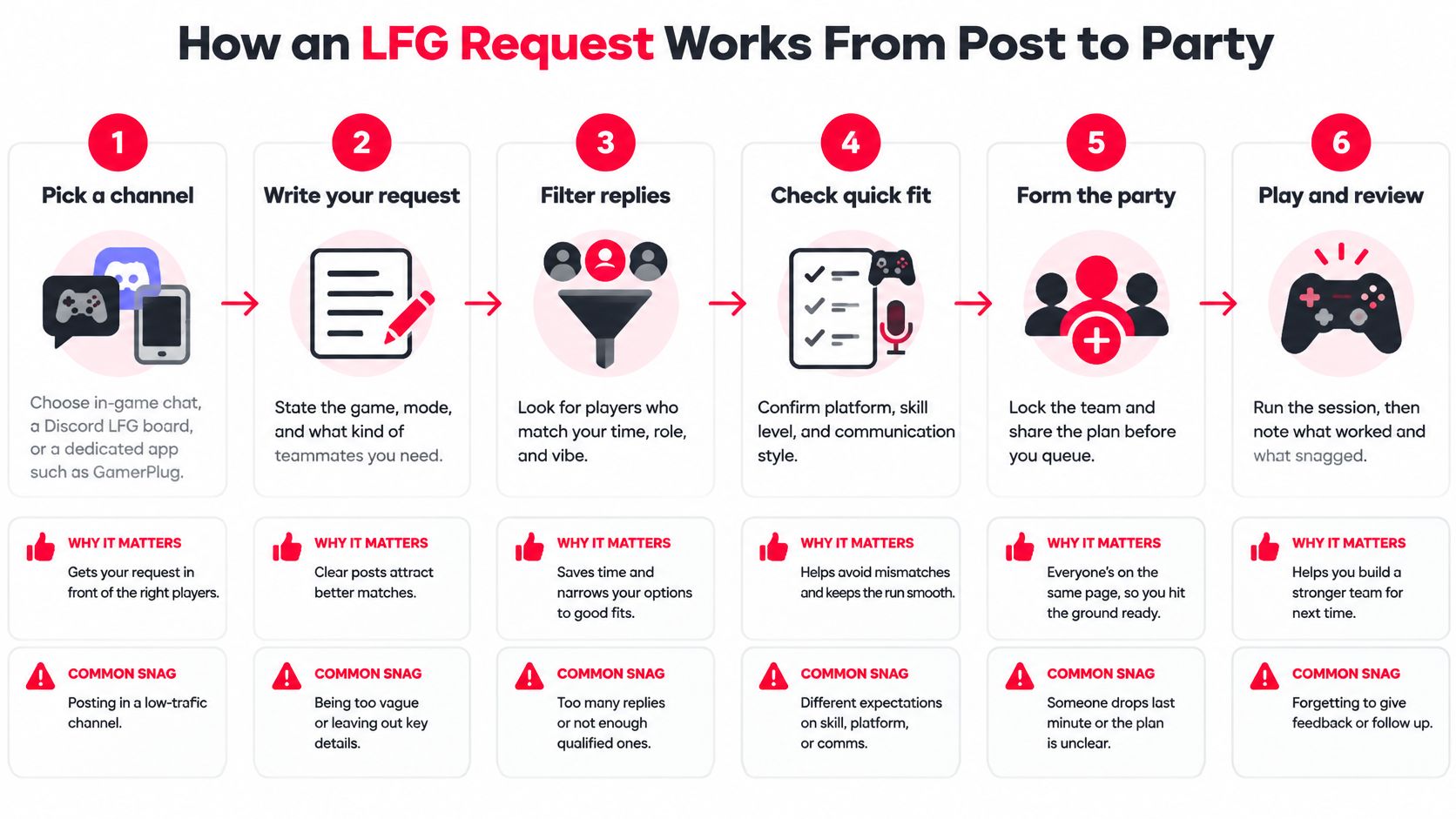
The flow below maps the full path from an empty lobby to a playing party.
The Six Stages
- Pick a channel. Choose in-game chat for speed, a Discord LFG board for community regulars or a dedicated app such as GamerPlug for structured listings. Pick the one where your game's players check at your play time.
- Post the request. Include game, mode, rank range, platform, mic need and open slots. For a WoW run, say, you'd also find dungeon details first so your listing names the exact content and roles.
- Replies arrive. Players send a request or ask a question. Answer within the hour while the post is fresh, because good candidates get picked up by other hosts fast.
- Check each candidate. Look at their profile, stats and clips before accepting. This is your cheapest quality control, and skipping it invites every problem the post was meant to filter.
- Invite and form the party. Accept or send invites, move into party or lobby chat and confirm the start time out loud. Silence here is where no-shows are born.
- Play and debrief. Run one match, then spend a minute on roles and communication. What worked, what snagged, do you queue again?
Where groups break: Most failed attempts stall at stage 3, not because nobody's online, but because the post is too vague to reply to.
Demand for this flow is constant, not occasional. Digital Wellness Lab's Pulse Survey found that in 2024, 72% of U.S. adolescents aged 13 to 17 reported playing multiplayer games with friends or family during a typical week. With that many players grouping up weekly, clear posts get answered and fuzzy ones get buried.
If You're the One Replying
Flip the checklist before you message someone else's post. Confirm the game, rank range, platform and mic requirement match yours first. Then send one short reply naming your role and your usual play times, and ask for the time zone before you join anything.
Replies like "inv me" get ignored because they force the host to interview you. A reply like "Gold 2 anchor, mic on, free 8 to 11pm ET tonight" gives the host everything needed to say yes. If you don't hear back, don't spam. Move to the next post and keep your own details ready to paste.
Vetting Teammates for Skill and Communication Fit
A rank badge is a résumé, not a reference letter. It confirms a player climbed to a number. It says nothing about whether they call rotations, share loot or stay steady after a lost fight. So treat vetting as a compatibility check run in a fixed order, with skill as the gate and behavior as the tiebreaker.
Communication gets this much weight because you can watch it happen. A 2024 esports study reported that an intervention increasing declarative communication during team fights significantly improved players' perceptions of team performance. The same pattern holds in team-sport psychology, where transactive memory, each player knowing who handles which job, tracks with how well a group performs. Owning a mic is a weak signal next to evidence like that.
Six Signals to Check in Order
| Signal | Good sign | Red flag |
|---|---|---|
| Verified rank | Matches the rank range in your post | Rank is "trust me" or far outside the range |
| Gameplay clip | Shows calm decisions and clear callouts | Only highlight reels or rage clips |
| Communication | Answers questions in short, clear messages | Ignores questions or opens with insults |
| Mic habits | States mic status upfront and uses it when asked | Claims a mic but goes silent in the first match |
| Schedule | Names two or three fixed play times | "Whenever" with no pattern |
| Play style | Describes role and goals in specific terms | Wants to play anything, anywhere |
Start at the top. Verified rank is a yes or no gate, so clear it first and save yourself the rest of the work if it fails. Then watch a clip with the sound on. A highlight reel shows aim; a clip with calm mid-fight decisions and clean callouts shows what someone does when the fight turns. The bottom three rows decide whether you found a one-night teammate or a regular, and a player who answers "whenever" and "anything, anywhere" on day one is usually the person you reschedule around for a month and never play with. If your group likes to test voice and tone face to face before a scrim, you can connect through Vidiocall to check audio quality before game night.
Ask Two Questions in Chat
Skip the interrogation. Two questions surface most mismatches:
- Role and callouts: "What role do you play, and how do you call information?" You want specifics, like concise pings plus short voice calls.
- Tilt response: "What do you do when a teammate tilts?" You are listening for steadiness, not a promise to shout louder.
Vague answers predict vague teamwork. Someone who cannot describe their own role in a chat window will not suddenly coordinate rotations under pressure.
If a candidate misses your rank range or dodges your questions, decline politely and move on. Forcing a fit costs you a match. Declining costs you ten seconds.
Staying Safe When Joining Strangers Online
Finding a squad isn't the same as finding a squad that feels safe. Most LFG advice stops at speed and rank, but you're handing strangers your time and your voice. This checklist separates the two before you're stuck in a lobby.
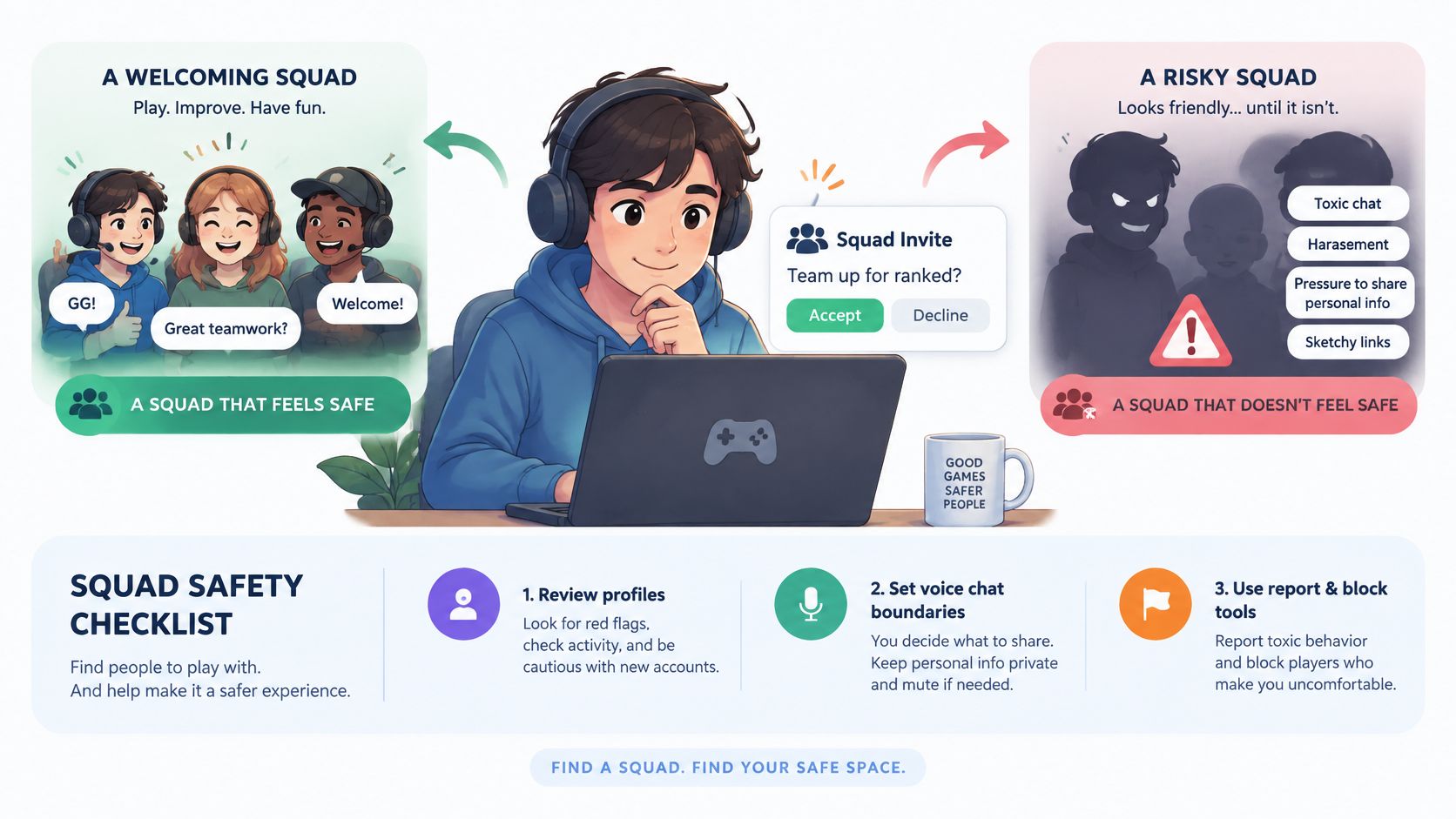
The risk is documented, not hypothetical. A 2025 University of California, Irvine report found that 85% of surveyed teen and young-adult players had encountered hate speech in multiplayer games, and more than one-third said they had been victims. Women, nonheterosexual players and people with disabilities faced higher risks. Safety is a matchmaking quality issue, not just a moderation problem after the damage.
Red Flags and Boundary Moves
Watch for pressure to move to voice or DMs within minutes, personal questions about age or location, and slurs or identity jokes in the first lobby. Any one of those is enough to leave. You don't owe a debate before you go.
Keep your first two sessions in the group chat where others can see the conversation. Share no real-life details, use mute and block freely, report through the in-app tool and leave a group without explaining yourself. Our guide to building toxic-free gaming spaces goes deeper on setting those norms as a host.
The short video below walks through spotting these warning signs in a live lobby.
Verified ranks and clip-based profiles lower your risk for a simple reason. A bad actor has to fake more evidence to get past them. Choose spaces that make faking expensive.
Turning a One-Night Partner Into a Regular Squad
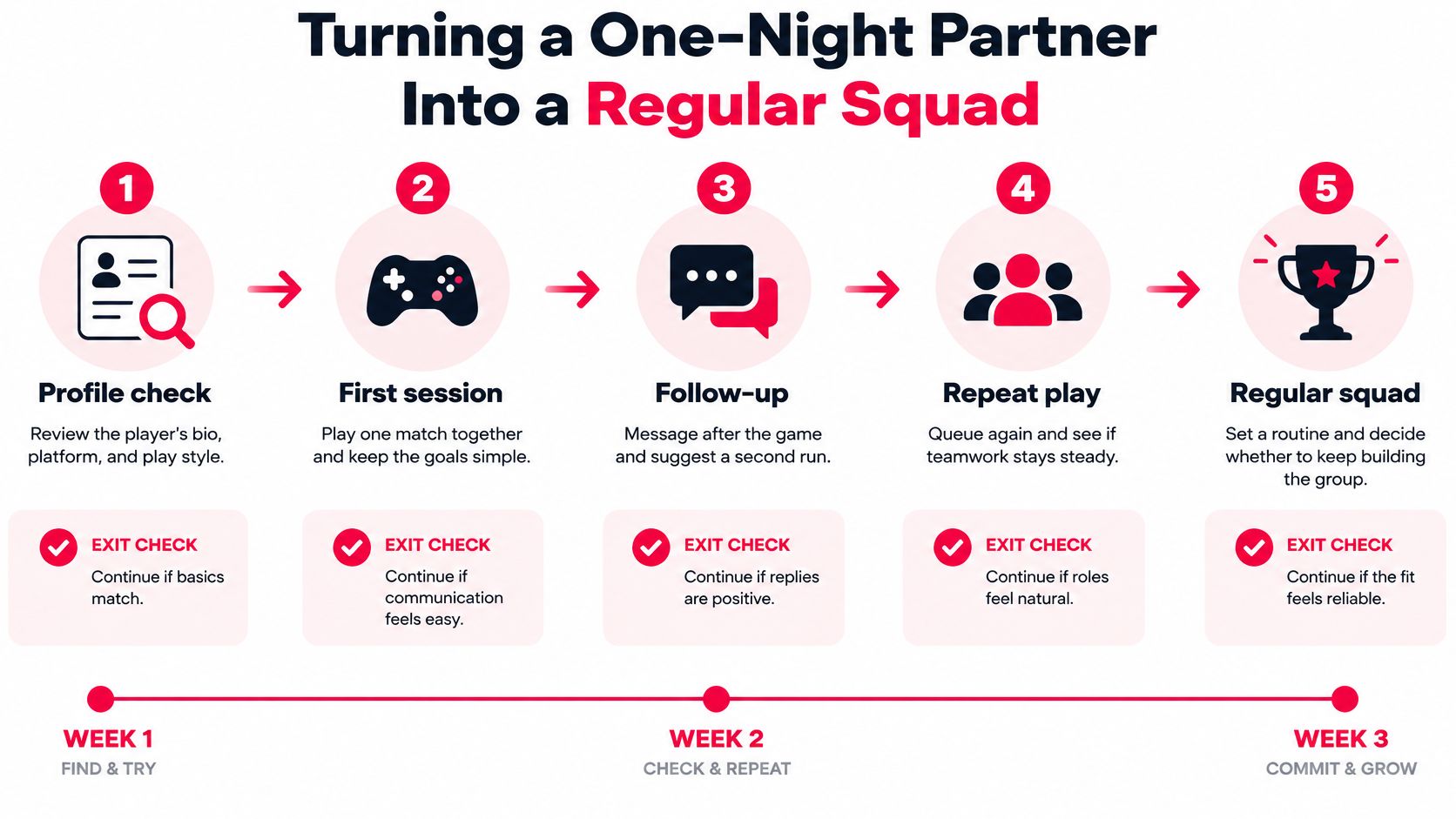
A good first match is a lead, not a roster. Say Maya answers your Apex post on a Tuesday, plays anchor cleanly and calls every rotation. Most players add her, queue randomly twice more and drift apart. A staged path over about three weeks turns that luck into a reliable squad.
Five Stages With Exit Checks
- Profile check. Confirm Maya's verified rank and a recent clip match your post before inviting. Exit here if either one contradicts what she claimed.
- Trial session. Play two or three matches in one fixed time slot. Exit if someone misses calls, goes silent or leaves early, because trial night is everyone's best behavior.
- Debrief. After each session, each player names one thing that worked and one thing to change, covering calls, tilt and role swaps. Keep it under five minutes in your squad group chat so feedback stays easy.
- Repeat queue. Return three to five times over about two weeks and watch whether no-shows and rage-quits fall. Exit if they don't, since repeat play is where real habits show.
- Commit. Agree a fixed schedule, a role plan and coaching expectations, then lock the roster. Streamers building a regular crew can use the same rhythm to connect with your Twitch viewers during community games.
The effort pays off because players want lasting connections. The ESA's annual study reports that 78% of U.S. players believe games can introduce them to new friends, and 55% play with others weekly.
One warning from the trenches. A casual player and a ranked grinder can enjoy one match together, but they'll usually fail at stage 4 unless tilt tolerance and goals match. Check goals before the trial session, not after three weeks of friction.
Post Your First Squad on GamerPlug
GamerPlug is a teammate-finding app on iOS, Android and the web for players on PC, PS5, Xbox and Nintendo Switch. Its Squads feature builds the workflow above into the listing itself. When posting a squad, you choose the game mode, rank range, platform and whether a mic is needed, then fill the party from replies.

Profiles show gameplay clips of up to 90 seconds plus play style, mic usage and schedule, and squad requirements are checked against players' real stats. That means the vetting signals and the stage 2 consistency check happen at a glance instead of through twenty chat messages. As player LyviaXO puts it, GamerPlug makes it easy to find people who match their vibe, not just their rank.
If you want the deeper breakdown, read our guide to choosing an LFG app. Then write your first post using the table fields, set a real rank range, post at your usual play time and answer every reply with a clear yes or no.
Your next regular squad is probably one clear post away, and GamerPlug gives you the structured listing, verified ranks and gameplay clips to find them without another night of silent randoms. Head to Gamerplug, post your first squad with your mode, rank range and mic requirement, and start vetting teammates who fit how you play.