
You've won four of your last six ranked matches, and the badge on your profile still reads Gold. A small voice in the back of your head says the game isn't counting the right games, and you start reading your teammates' scorelines more closely than your own.
Or the reverse happened. You crossed into a new division, queued with a friend two tiers above you, and the lobbies changed character so fast it felt like a different game.
Both experiences come from the same misunderstanding. Visible rank is a lagging summary. It reports where you've been over a stretch of matches. What happens next is shaped by your current form, how far your rating sits from where the system thinks you belong, and who's standing in your party when you hit search. Read the badge as a record of the past rather than a verdict on tonight, and the whole system opens up: the divisions, the SR swings, the party rules and the teammates worth inviting.
Table of Contents
- What COD Ranked Play Is and How It Differs
- How to Get Into COD Ranked Play
- Skill Divisions and Rank Thresholds to Know
- How Skill Rating Moves After Every Match
- Party Size and Rank Spread Compared
- Vetting Teammates by Skill, Region and Schedule
- Build Your Ranked Squad Today
What COD Ranked Play Is and How It Differs
COD Ranked Play is a competitive 4v4 mode that runs on Call of Duty League rules, including the League's competitive restrictions, map pool and modes. You don't get a separate rulebook to learn. Ranked hands you the same framework the pros compete under, and it comes down to three modes: Hardpoint, Search & Destroy and Control.
The mode arrived with Season 02 of Call of Duty: Modern Warfare II on February 15, 2023, built by Treyarch in partnership with Infinity Ward and the Call of Duty League, as Activision's launch announcement sets out. Call of Duty itself began on October 29, 2003, so a formal, franchise-supported ranked system landed close to twenty years into the series' life. That long gap explains a lot of the confusion: players raised on public lobbies had to learn a new vocabulary of SR, divisions and party rules almost from scratch.

The cleanest way to hold the difference in your head is a pickup game versus a league table. Public multiplayer is the park: teams reshuffle, the scoreboard resets, nobody writes anything down. Ranked is the table. Every result gets recorded, the standings move, and a month of Saturdays tells a story that your last match alone can't.
The first number you'll see on screen is your Skill Rating, usually shortened to SR. It tracks competitive progress and sorts you into a division. Win and it rises, lose and it drops, though not by an identical amount each time. A division is the band your SR falls into, and the bands are wide enough that two players sharing one can be a long way apart in real strength.
Ranked suits players who want measurable progress, a structured place to practise rotations and comms, or a shared goal with three friends. If you'd rather drift between playlists with music on and no number judging you, casual has more to offer, and there's nothing wrong with that.
How to Get Into COD Ranked Play
Getting into ranked isn't difficult. Most players who bounce off it do so because of one missed check, not because the mode is hidden. Work through the route in order and you'll be queuing inside a few minutes.
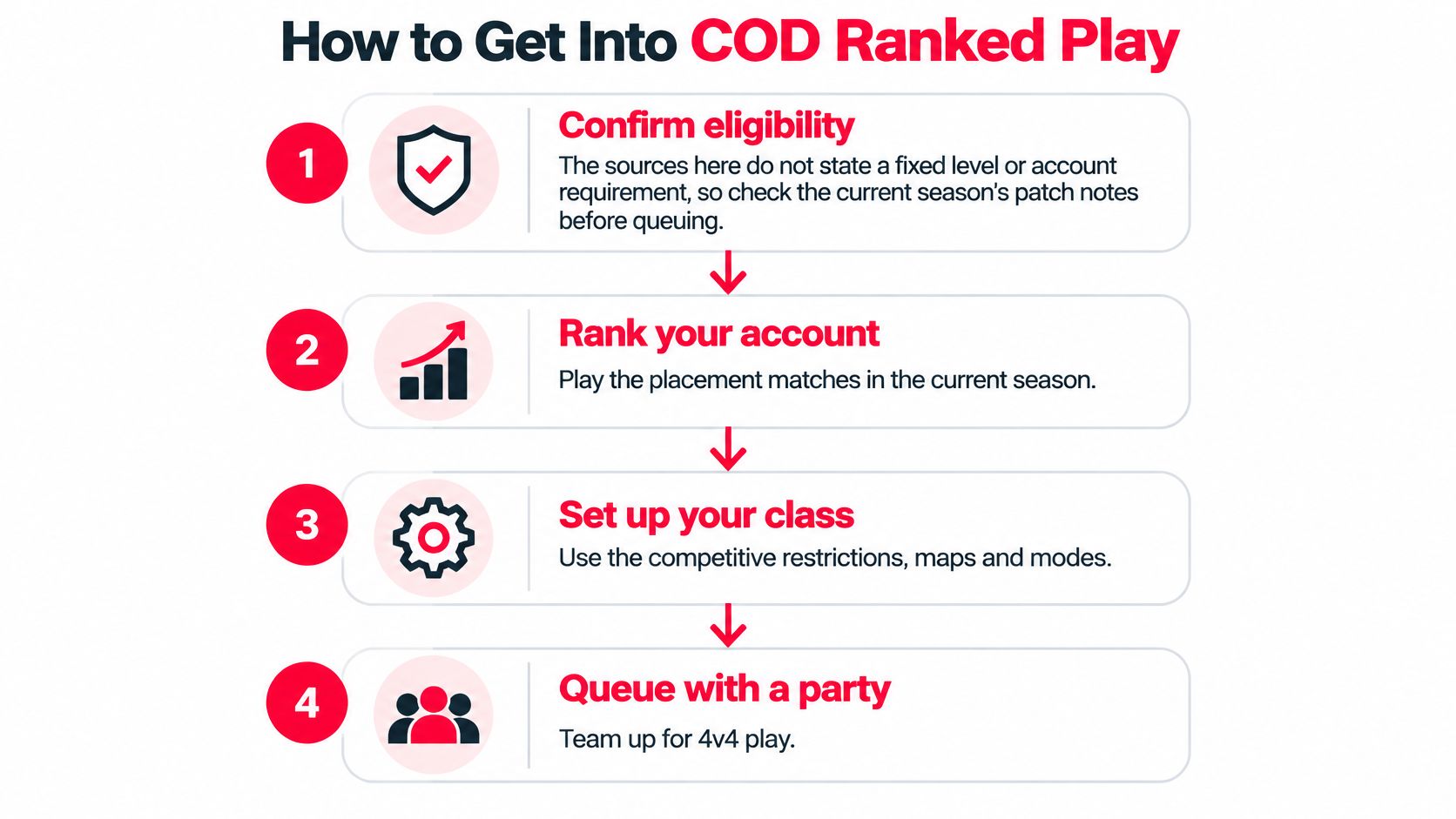
Confirm eligibility for the season you're in. Ranked has been gated before: in Modern Warfare II, the mode opened to players who had reached Level 16, according to the Season 02 patch notes. Treat that as history rather than a promise, since each title sets its own entry condition. The usual slip is assuming an old requirement still applies and then wondering why the playlist won't open.
Update the game and check the mode is live. Ranked arrives on a season schedule, so an unpatched client can leave you staring at a menu that doesn't match what you saw online. The slip here is trying to queue before the update finishes installing.
Choose the ranked entry in the multiplayer menu, not a casual playlist. This sounds trivial until you play three matches, see no SR change and decide the system is broken. It isn't. You were in the wrong queue.
Decide solo or party before your first match. Party size and rank spread change the lobbies you get, so make that call deliberately instead of accepting an invite five seconds before the queue pops.
Play a block of matches, then check SR once. A single result means very little. Ten matches show a direction. The common slip is judging your whole rank from one lopsided loss.
Write down your starting division and the gap to the next threshold. That gives you a number to measure against instead of a vague feeling about how it's going.
If you're unsure which gate applies this season, our guide to rank requirements covers how entry conditions have worked across recent titles.
The mode looks like this once you're inside it:
A healthy start doesn't look like a hot streak. It looks like a steady direction across at least ten matches, with a couple of rough sessions absorbed without a change in plan.
Skill Divisions and Rank Thresholds to Know
Divisions aren't decorative. They're the sorting system most teammate-finding leans on, so the exact numbers matter, and so does what they don't tell you. Progression runs on Skill Rating, and Activision Support's Ranked Play documentation lays out the bands:
| Division | Skill Rating range |
|---|---|
| Bronze | 0–899 SR |
| Silver | 900–2,099 SR |
| Gold | 2,100–3,599 SR |
| Platinum | 3,600–5,399 SR |
| Diamond | 5,400–7,499 SR |
| Crimson | 7,500–9,999 SR |
| Iridescent | 10,000+ SR |
| Top 250 | Public leaderboard of the highest-SR players |
The first seven rows give you a ladder and a target. Top 250 is a different kind of thing: a public ranking rather than a band you sit inside. In Modern Warfare III, that leaderboard was reserved for players with more than 10,000 Skill Rating points, per Activision Support's Ranked Play overview, which means holding a spot depends partly on what everyone else is doing that week.
Reading a band, not a verdict
Two players can sit on opposite sides of a line and be the same player. Someone at 3,500 SR shows Gold, someone at 3,700 SR shows Platinum, and if you watched them back to back you might not be able to tell them apart. A boundary sorted them by a number, not by ability.
The same logic makes a threshold feel brutal. Sit at 7,450 SR and you're 50 points short of Crimson. One good session crosses it and your profile suddenly says something different about you than it did on Tuesday, even though nothing about your aim changed.
Your division is a receipt, not a forecast. It records where your SR has been, and it can lag well behind the player you are this week.
Distance to the next threshold is the useful part of the table. Find your SR, note its band, then note how many points separate you from the row above. That figure sets your expectations far better than the badge does, and the trend across recent matches is what tells you whether the gap is closing.
Use a division as a first filter for teammates, never as a final verdict on skill. A Gold player with reliable comms and three nights a week of availability is often a better partner than a Diamond who solo-queues and goes quiet.
How Skill Rating Moves After Every Match
The version of ranked most players carry around is simple: win and you go up, lose and you go down. That's the headline, and it's incomplete enough to start arguments inside a squad after a bad night.
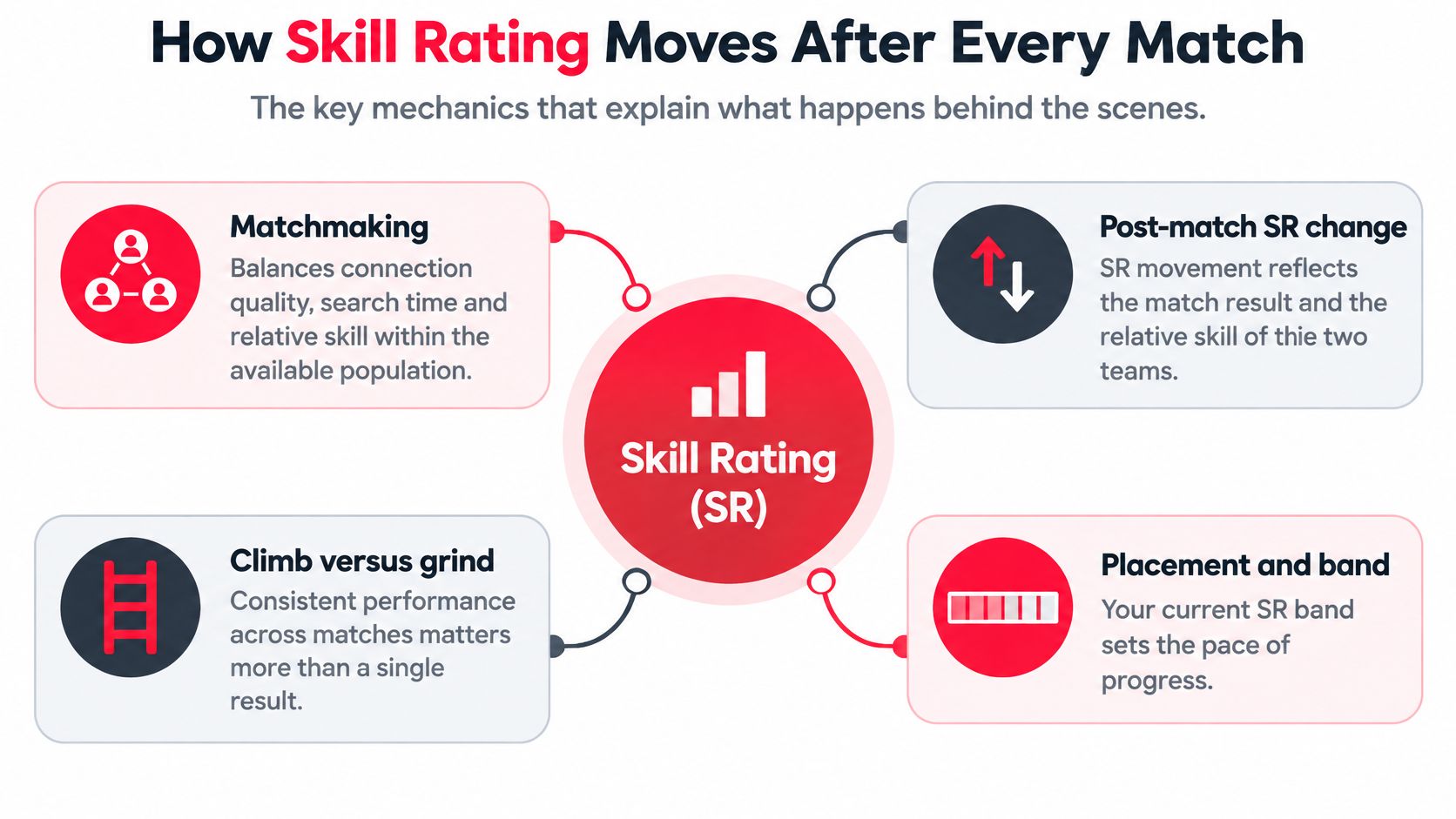
Matchmaking balances three objectives at once: connection quality, queue search time, and the relative skill of whoever is available, as Activision's ranked matchmaking intel explains. That third piece is why a 7pm queue can feel different from a 1am one, and why the same squad can have wildly different nights depending on who's online.
Why two teammates move differently
Say you and a friend win the same Hardpoint 250–180. You've been climbing fast and your SR sits well below where the system projects you, so the win pays you more. Your friend is parked near his projected rank, so his gain is smaller. Same lobby, same scoreline, different numbers.
Flip it. You lose 250–240 to a team rated above you, and the player on your side with strong individual numbers may drop less than the teammate who went quiet for the second half. The result is shared, the movement isn't.
What isn't published: the exact weighting between match result, individual performance and margin of victory. Any chart claiming precise percentages is dressing up a guess.
A four-metric tracking routine
Chasing the badge alone will drive you up the wall, because you can gain SR all evening and stay in the same division. Track these instead:
- SR per session. Log your starting and finishing number, not just whether the badge changed.
- Win rate across your last ten matches. Ten gives you a direction; three gives you noise.
- Round or map margin. A 3–0 Search & Destroy loss and a 250–240 near-miss carry different information.
- Your own scoreboard impact. Objective time, damage, kills per round. "Top fragging" isn't automatically optimal ranked value, because the official system weighs more than raw kills.
If SR is falling while those four look healthy, the issue is usually queue conditions: a tired late-night run, a mixed-rank party, or a thin population in your region at that hour. Check the trend and the conditions before you blame the people in your lobby.
Party Size and Rank Spread Compared
Who you queue with changes what you face. That isn't a rumour passed around a forum; it's how the system is built.
| Party setup | Rank spread | How lobbies are set | Best for |
|---|---|---|---|
| Solo queue | Your own SR only | Matched to your SR, widening as search time grows | Personal rank progression |
| Full party, same rank | Narrow | Matched near the shared rank range | Steady ranked climbing |
| Full party, mixed ranks | Wide | Based on the highest-ranked member | Coached practice and social play |
The highest-ranked player sets the lobby
Call of Duty's own ranked matchmaking explainer states that a search starts with a narrow SR disparity and widens the acceptable range as search time grows. It also confirms that in Black Ops 6, a full party of four can play together regardless of individual ranks, with matchmaking based on the highest-ranked player in the party, as Activision's ranked matchmaking intel describes.
Put a 2,000 SR player in a stack with a 6,000 SR friend and the lobby gets built around the stronger account. The lower-ranked teammate faces opponents far above their own badge, which explains why the games feel so much harder than the number suggests. The stronger player, meanwhile, gets less reliable support than the lobby expects, because one teammate is swimming.
Three setups, three different jobs:
Same-rank stack. Everyone within a couple hundred SR, shared hours. The most predictable climb, because the lobby matches the badge you can all see.
Mixed squad. Fine when the goal is coached practice: the lower player learns fast and the higher player works on calling. A poor arrangement for measuring your own progress, since your results reflect a lobby you didn't earn.
Solo queue. Your SR, your session. Slower to build chemistry, cleaner signal about your own level.
Before anyone hits search, agree four things: the goal for the night (rank, practice or social play), the lobby level you expect, what you'll do if matches feel unfair, and a shared play window. A written Call of Duty squad listing that names mode, rank range and platform up front does most of that work before anyone joins.
The best party is the one where all four people expect to face the same lobbies.
Vetting Teammates by Skill, Region and Schedule
Inviting the right person is a five-minute job with a checklist and a coin flip without one. Run the checks in this order, because the first two eliminate most bad fits before you spend time on the rest.
A pre-invite checklist
- Current SR inside the band you're targeting. Not their peak, not their best season. The number they're playing at now.
- Recent ranked activity in the past week. A profile with no matches since the season turned over tells you nothing about form.
- Compatible region and play window. If they play two hours after your group logs off, nothing else matters.
- Mic use and communication style. Callouts or chatter, planned or reactive. Both are fine, but they need to match yours.
- Role and play style. An anchor and a slayer fit together; two players who both want to roam usually don't.
- Platform compatibility for party play. Cross-play exists, but party chat and input differences still shape the night.
Region and play window are hard constraints, not preferences. A teammate on a distant server or a different schedule produces unstable matches no matter how good they are, because the search has to reach further to fill a lobby. Filter these first and you save yourself the awkward conversation later.
Narrow SR bands do similar work. A squad with a tight band and shared hours gets more even lobbies than one with a wide spread and mismatched schedules, because the matchmaker has less stretching to do. Two hundred SR of difference is manageable; two thousand is a different game.
On GamerPlug we monitor every profile to keep the platform real and legit, which is the same principle to apply wherever you recruit: judge an applicant by evidence of recent, checkable play rather than by a username or a badge.
Verified ratings are only as good as the check behind them, and our explanation of verification of ratings covers what a synced rank proves and where it stops being useful.
A badge is a claim. Ten matches this week are evidence.
Build Your Ranked Squad Today
Reading the ladder and acting on it are separate skills. This is the version you can run tonight.

Pick the goal before the roster. Rank climb, coached practice or a social squad. Match the party setup to the goal rather than assembling whoever's online and hoping.
Confirm your own numbers. Your current SR band and your last week of activity. A listing built on a stale peak gets applicants who expect a player you're not right now.
Post the listing with the details that do the filtering. When you post a squad on GamerPlug you choose the game mode, rank range, platform and whether a mic is needed, and requirements are checked against players' real stats. GamerPlug is trusted by more than 5,000 players, so the pool is wide enough to be picky inside.
Vet every applicant against the checklist. Current SR, recent activity, region, mic, role, platform. Six lines, under a minute each.
Queue inside the agreed window, then review together after ten matches. One session proves nothing. Ten matches show whether the band and the schedule were right.
The gap between a frustrating season and a good one is rarely a few hundred SR of raw talent. It's whether the four people in the lobby wanted the same thing at the same hour. Get that part right and the climb stops feeling like a lottery.
GamerPlug is built for exactly this: real profiles, synced ranks and squad listings that name the mode, rank range, platform and mic requirement before anyone joins, so you're not guessing at a badge. Post your squad, set the filter and fill the party with players whose current form matches yours. Head to Gamerplug and get your four together for the next session.