You're ready to queue, your usual duo is offline, and solo queue just handed you a silent teammate, a tilted teammate, and someone who left after round two. You don't need more randoms. You need a looking for group post that filters for the right people before the lobby forms. Rank, platform, and region matter, but they don't decide whether a squad sticks. Communication style and safety do.
Table of Contents
- What LFG Means and the Shorthand Around It
- Anatomy of an LFG Post That Gets Replies
- Choosing a Platform Among Discord, Subreddits, Lobbies and LFG Apps
- Matching Communication Style Before You Queue
- Voice Chat Safety and Setting Your Limits
- Profile, Vetting and Follow-Up Habits
What LFG Means and the Shorthand Around It
LFG stands for Looking for Group. It's a post saying you want to join a session or fill an open party now or soon. The abbreviation tells readers your situation before they read anything else, so pick the one that matches your headcount.
| Abbreviation | Full meaning | Use it when | Example post |
|---|---|---|---|
| LFG | Looking for group | Joining a session or filling an open party | LFG Apex ranked, 2 slots, mic on |
| LFM | Looking for more | Your party is set and needs 1-3 players | LFM 2/4, Fortnite squad, EU evenings |
| LFD | Looking for duo | You want exactly one partner | LFD Valorant duo, Immortal range |
| LFT | Looking for team | You are the player seeking a team | LFT Overwatch 2 team, weekend mornings |
| LFP | Looking for players | An organizer is recruiting a roster | LFP Valorant roster, scrims Tue and Thu |
| LFS | Looking for scrims | A team wants practice matches | LFS scrims, Apex, 8 PM ET |
Read the Room Before You Post
The same letters can mean different things across communities. Check the norms of the server or subreddit first, especially for LFT and LFP, which some groups use for long term rosters and others use for a single night. If a channel has a template, use it. Mods delete posts that ignore local format, and players skip posts they have to decode.
Players have long used online games to meet people, not just to fill a slot. In 2025, 71% of players across 21 countries said video games introduce people to new friends and relationships, according to the Entertainment Software Association's global Power of Play report. That's why a clear post does more than recruit for tonight. It starts a recurring group.
Practical rule: Match the abbreviation to your headcount. A mismatched abbreviation forces readers to guess how many slots are open, and they'll skip you.
Anatomy of an LFG Post That Gets Replies
A strong post answers what you play, who you need, when you play, and how to reply within a few seconds of reading. Every missing field creates a follow up question, and every follow up question loses you a good candidate who found a clearer post first. Write for a stranger who is scanning on a phone between matches.
The checklist below puts the eight fields in reading order.
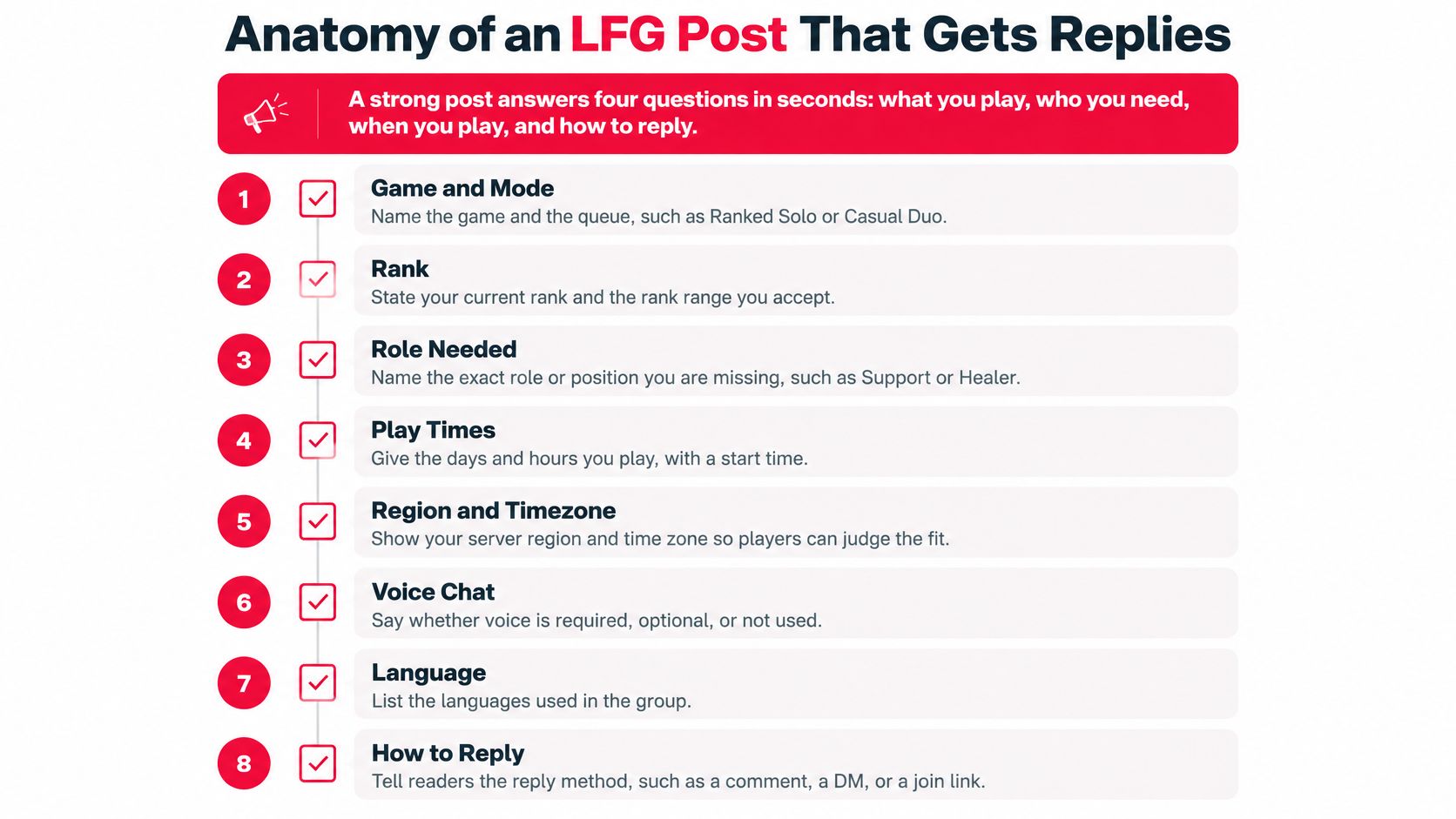
The Eight Fields in Order
| Post field | What to write | Example |
|---|---|---|
| Game and mode | Title, mode and season if relevant | Apex Legends, ranked battle royale |
| Rank range | Lowest to highest band and how it is verified | Gold 3 to Platinum 2, synced rank |
| Platform | Console or PC, plus cross-play yes or no | PS5, cross-play off |
| Open slots | Players needed and any role | 2 slots, one support or in-game leader |
| Mic and comms | Required, optional or text only, with style | Mic required, calm callouts |
| Schedule | Days, hours and time zone | Weeknights 8-11 PM ET |
| Goal | Ranked grind, casual play or tournament prep | Ranked grind, no tilting |
| Call to action | How to reply and what to send | Reply with rank proof or a clip link |
Use exact wording. "Apex Legends, ranked battle royale" lets a reader decide instantly. "Gold 3 to Platinum 2, synced rank" does the same for skill. Vague phrases like "anyone" or "chill vibes" give a stranger nothing to decide, so they scroll past.
If you can prove your rank through a synced profile or a short clip, say so in the rank field. Proof removes the first round of questions. It also signals that you expect the same honesty back, which filters out players who inflate their rank without anyone having to call it out.
Time zone is the field people skip most often, and it causes the most no shows. "Tonight at 8" means four different start times to four different readers. "Weeknights 8-11 PM ET" ends that problem in five words.
Rewriting a Weak Post Field by Field
Start with the post everyone has written and nobody answers well. "LFG ranked, anyone?" It names no game, no rank, no slot count, and no way to reply. Here's the rebuild.
- Name the game and mode: Apex Legends, ranked battle royale, current split.
- Set the rank range and verification: Gold 3 to Platinum 2, synced rank on profile.
- State platform and cross-play: PS5, cross-play off to keep input consistent.
- List open slots and role: 2 slots open, one support preferred.
- Declare comms: Mic required, calm callouts, no yelling after losses.
- Add schedule and reply instruction: Weeknights 8-11 PM ET, reply with rank proof or a clip link.
Put together, it reads like this.
LFG Apex Legends ranked battle royale. Gold 3 to Platinum 2, synced rank. PS5, cross-play off. 2 slots, one support preferred. Mic required, calm callouts. Weeknights 8-11 PM ET, ranked grind, no tilting. Reply with rank proof or a clip link.
Apply the Stranger Test
Read your finished post as someone who has never met you. Could a player who matches it say yes within ten seconds? If they still need to ask your platform, your hours, or whether a mic is required, the post isn't done.
A strong looking for group post filters out mismatches as much as it attracts matches. That's a feature, not a loss. Three replies from players who fit beat twenty replies you have to interview one by one. Say what you need plainly, and the right players will recognize themselves in it.
Choosing a Platform Among Discord, Subreddits, Lobbies and LFG Apps
Your platform changes who sees your post, how quickly they can answer, and what you can learn about a potential teammate before queueing. Choose based on the group you want: a quick fill for tonight, a recurring squad, or players with specific needs. Rank and region help narrow the search, but the post and profile should also reveal whether your communication styles and expectations fit.
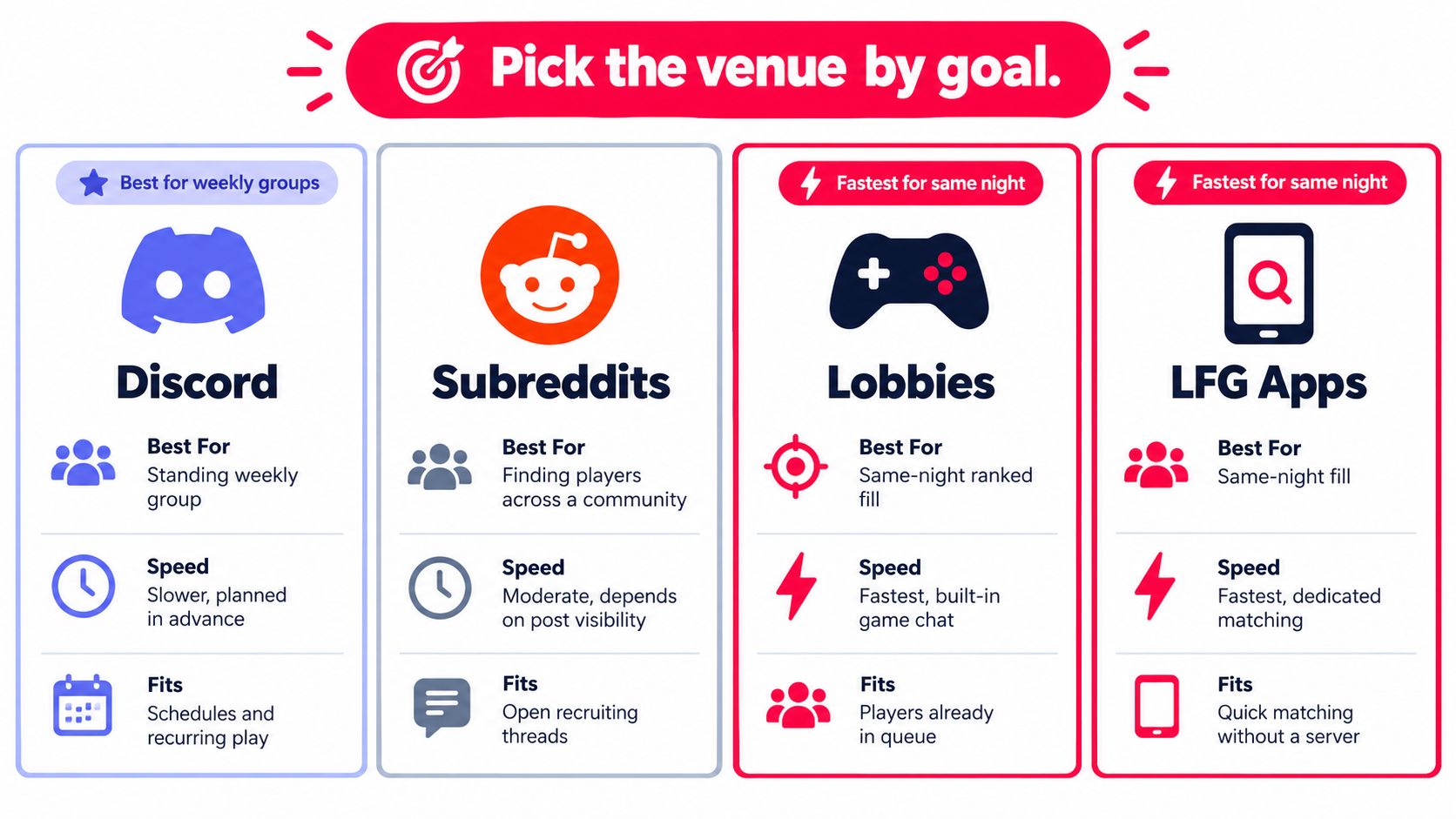
Where Each Venue Wins and Loses
| Venue | Best for | Speed | Verification | Watch out for |
|---|---|---|---|---|
| In-game chat or friends list | Quick fills with people you already know | Fast when friends are online | Game profile only | Few filters and no comms info |
| Discord LFG server | Recurring groups with set schedules | Fast if the server is active | Self-reported | Clutter; needs clear channel rules |
| Subreddits or game forums | Detailed requests and niche communities | Slow; replies can take hours | Self-reported | Posts sink quickly |
| GamerPlug | Matching on rank, platform, mic and schedule | Fast when players are active | Clip-based profiles, synced ranks on supported games | Limited to its supported titles |
Discord suits players who want a regular group. Role channels, schedule boards, and active moderators can make a server a dependable place to recruit. The trade-off is that dead or cluttered servers bury posts, so check recent activity and channel rules before writing a detailed LFG post.
Subreddits and game forums give you room to explain a niche mode, preferred communication, or an accessibility need. That detail helps players judge compatibility before replying, though the wait can stretch to hours and posts can sink quickly. For a specialized group, a slower reply may be worth the better fit.
In-game lobbies work well when you need teammates who are already playing your title. The drawback is limited information: a username and rank badge rarely tell you someone's schedule or how they communicate. If nightly fills are turning into a search for a regular roster, this esports team finder approach to building a roster shows how structured recruiting differs from lobby recruiting.
The short walkthrough below shows a dedicated app's posting flow.
GamerPlug is a free app on iOS, Android, and the web for PC, PS5, Xbox, and Nintendo Switch players. Its Squads feature lets you post the mode, rank range, platform, mic requirement, and open slots. Profiles include clips of up to 90 seconds, with ranks synced automatically for Apex Legends, Fortnite, and League of Legends. Its limits matter: it covers only supported titles, and filling a squad depends on player activity in your game and region. Clips and profile details can help you screen for communication fit, but they cannot guarantee someone will suit your group.
Choose the venue where your target players are active. A clear post in a busy community gives you a better shot at finding compatible teammates than a perfect post where nobody is looking.
Matching Communication Style Before You Queue
Your rank can match perfectly and the first fight can still feel like four people playing separate games. The post and profile should help you find teammates who communicate in a way you can work with, not just players on the same platform and in the same region.
A peer-reviewed mixed-methods study of 48 ad hoc League of Legends teams comprising 135 players found that team cohesion was associated with communication frequency, and cohesion was associated with team satisfaction independently of match outcomes. The study did not test whether matching communication styles improves a squad. Treat style-matching as practical screening: it sets expectations before the queue and gives everyone a clearer idea of how the team will play.
Five Styles and Where They Clash
| Comms style | What it sounds like | Pairs well with | Clash risk |
|---|---|---|---|
| Shot-calling | Short orders, such as "rotate B, 2 on the ledge" | Players who want structure and accept direction | Clashes with players who ignore leads |
| Concise callouts | Enemy positions, cooldowns, no small talk | Ranked pairs and tactical shooters | Quiet players can seem silent |
| Relaxed chat | Banter between fights, few calls | Casual squads and friends | Slows decisions in fast tactical games |
| Coaching | Patient explanations and review after rounds | New players and learning groups | Too slow for ranked grinders |
| Text or no mic | Pings, chat and emotes only | Text-only, captioned or no-mic players | Hard in games that need live callouts |
Put one clear preference in your post, then ask candidates what they prefer. For example, “short callouts, no coaching” gives a different expectation from “casual chat, learning the mode.” Their answers help you spot a mismatch before anyone spends a session getting annoyed.
Mic On Is Not the Same as Structured Comms
A mic only means someone can speak. Structured comms are brief, useful calls, such as an enemy position, a target, or an immediate rotation. Write “mic required, concise callouts during fights” instead of only “mic required.” For setup and etiquette tips, this guide to voice chat for gaming covers the practical side.
Make room for text only chat, captions, or no mic play in your post when those formats work for the game. Pings, typed calls, or slower callouts can help a squad coordinate, provided everyone knows the format before queuing. Choose teammates whose expectations fit yours, and describe the kind of communication you can offer as clearly as what you want from them.
After two sessions, ask whether the squad communicated as described. If not, adjust the post or try a different group.
Voice Chat Safety and Setting Your Limits
A full squad can have the right rank, platform, and region and still fall apart when someone starts insulting teammates. Voice chat helps with coordination, but a mic alone tells you little about how a person handles pressure. Choose teammates by communication behavior and safety, not hardware. The NYU Stern business case on voice moderation and toxicity discusses voice-chat toxicity and moderation; the figures sometimes repeated from it are difficult to assess without clear survey details, so there's no need to rely on them to set a squad standard.
Three Filters Before the First Session
- Set the tone in your post: Say whether voice is required or optional, and spell out expectations, such as calm callouts and no insults.
- Ask a scenario question: How would they respond to a teammate who tilts? What would they do if someone used a slur in chat? Listen for a clear response, not just “I'm chill.”
- Ask for practical proof: Request a short gameplay clip or a reference from a past squad. Neither guarantees good behavior, but both give you something concrete to discuss before you queue.
Decide your own limits before joining. Choose which behavior ends the session, such as repeated insults or hate speech, and make sure you know how to mute, block, or leave. Agreeing on those boundaries helps create toxic-free gaming and positive communities.
If someone crosses your limit, leave and report the behavior through the platform's tools. You don't owe the lobby an argument. Leaving costs one match; staying can cost the whole night.
Profile, Vetting and Follow-Up Habits
Your profile is your reputation before the first match. Players decide whether to reply to your looking for group post based on what they can verify in seconds. A clever bio doesn't survive that scan. Proof and reliability do.
What a Credible Profile Contains
- Current rank with proof: A synced rank or screenshot, not a claim in your bio.
- One real gameplay clip: 30 to 90 seconds of normal play, not only highlight reels.
- An honest play style line: Your actual role, including the roles you're still learning.
- Mic status and comms style: Required, optional, or text only, plus how you call.
- Your usual hours: Days, times, and time zone, matching what your posts say.
Keep the clip honest. A clip showing a clean rotation and clear callouts tells a host more than a montage of your three best plays ever. Hosts aren't scouting for a pro team. They're checking whether you play the way your post claims you play.
The Vetting Sequence From Post to Regular Squad
- Choose one venue from the platform comparison based on your goal, not habit.
- Post using the field checklist so replies arrive pre filtered.
- Vet every reply by checking rank proof, the clip, the stated comms style, and any reports against the person.
- Run a short two game trial before committing to a regular schedule.
- Agree on comms rules and a leave rule, such as stepping out after repeated abuse.
- Confirm rank and schedule in your first reply, respect the host's slot call, and say early if you need to leave.
Two games is enough trial. You'll hear comms under pressure, see how someone handles a lost round, and learn whether their schedule claim was real. Committing to a weekly slot before that trial is how groups end up carrying a mismatch for a month out of politeness.
Don't pressure a teammate for falling just below your rank range. If their clip shows clean fundamentals and their comms fit, a small rank gap closes fast. If it doesn't fit, decline politely and move on. Both answers take ten seconds.
Follow-Up Habits That Build a Roster
After the match, thank the squad by name. It sounds minor, and it's the reason hosts invite you back first. Leave a short rating where the platform allows it, focusing on comms and reliability rather than stats.
Report abuse instead of arguing in chat. Reports protect the next player who reads that post, and they keep your own record clean. Screenshots and clip timestamps make a report stronger than a paragraph of frustration.
Keep a list of partners you'd queue with again, with a one line note on role and comms style. That list is your real reward for posting well. Within a few weeks it turns nightly recruiting into a quick message to people you already trust.
Reliability compounds. Show up on time twice, and hosts start saving you a slot before they post publicly.
Start with a single post today. Use the eight fields, name your comms style, set your limits, and run a two game trial with whoever fits. One good session built that way beats a week of hoping random matchmaking improves.
Ready to stop rebuilding your squad every night? Post your mode, rank range, platform, mic requirement, and open slots, check clips and synced ranks before you queue, and find teammates who match how you really play at Gamerplug.