Most guides answer “Is Rainbow Six Siege cross platform?” with a lazy yes or no. That's the wrong question. The issue is that Siege splits crossplay and cross-progression, and it uses matchmaking pools that change depending on who leads the squad, what input they use, and which platforms the party is allowed to pull from.
That's why two players can both have crossplay turned on and still have very different experiences. One duo feels like they're in a normal console queue, another gets pulled into a broader pool that changes the lobby mix immediately. Once you understand that split, the whole feature stops feeling mysterious.
Table of Contents
- Why Rainbow Six Siege Cross Platform Is Not Just One Feature
- How Ubisoft Rolled Out Crossplay Over Seven Years
- Understanding the Matchmaking Pool System
- Enabling Crossplay on PC, PS5, and Xbox
- Linking Ubisoft Connect for Cross Progression
- Common Misconceptions About Cross Platform Play
- Building Cross Platform Squads That Actually Stick
Why Rainbow Six Siege Cross Platform Is Not Just One Feature
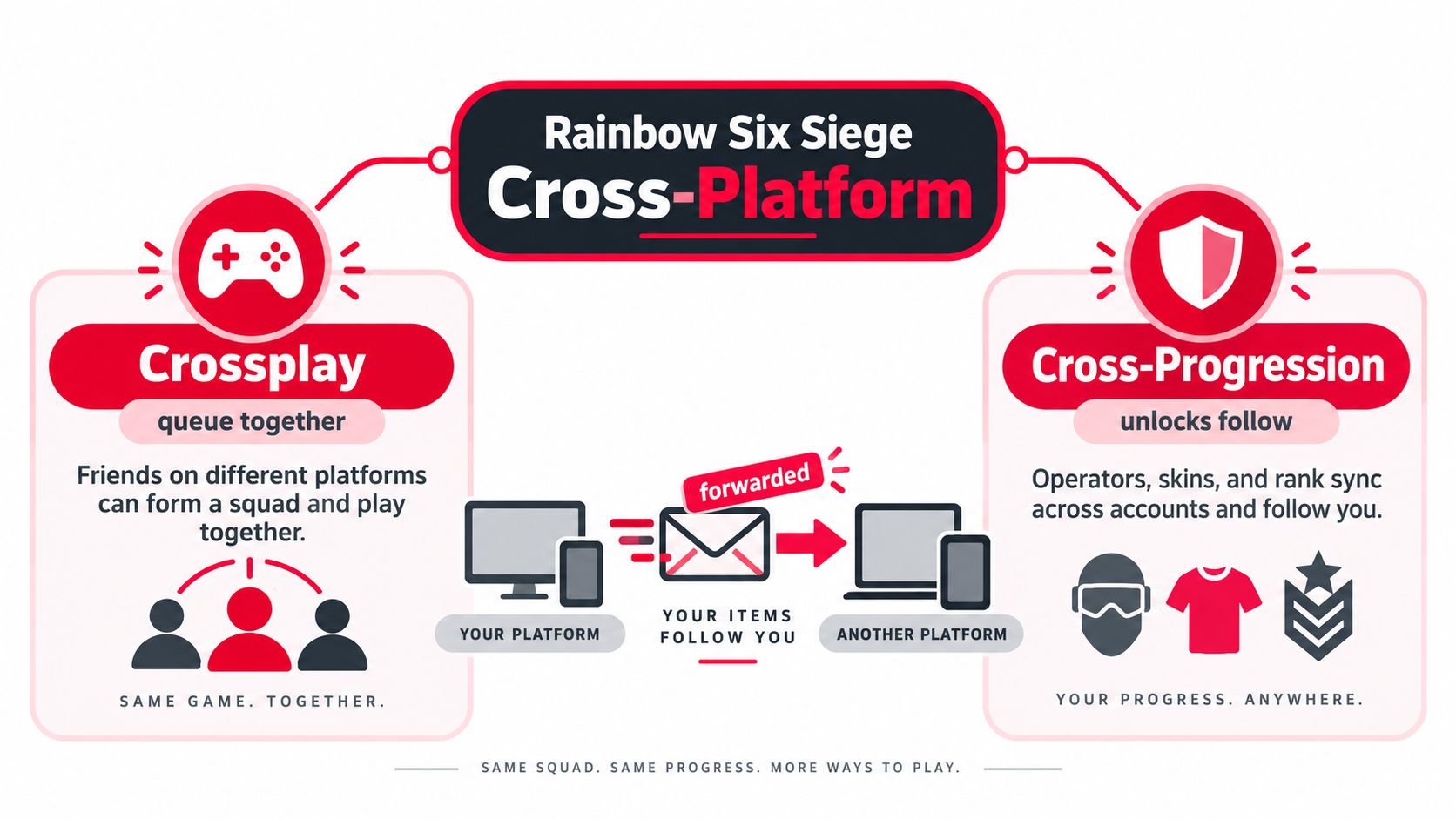
Crossplay and cross-progression solve different problems. Crossplay lets friends on different platforms sit in the same lobby. Cross-progression works like a forwarding service for your account, carrying over items, currencies, saved data, and progress no matter where you log in.
Siege ties both systems to Ubisoft Connect, which is why the timeline matters. Ubisoft says crossplay and cross-progression first launched on PC, Stadia, and Amazon Luna on June 30, 2021, then reached Xbox and PlayStation consoles in early December 2022 with Year 7 Season 4, Operation Solar Raid. The game itself launched on December 1, 2015 for PlayStation 4, Windows, and Xbox One, later arrived on PlayStation 5 and Xbox Series X/S on December 1, 2020, and came to Stadia on June 30, 2021. For a wider overview of how these systems work across multiplayer games, GamerPlug's cross-platform gaming guide helps put the setup in context. Ubisoft's rollout shows Siege moving carefully from platform-separated play to a broader cross-platform model (Ubisoft's crossplay and cross-progression rollout dates).
What Siege actually syncs across platforms
Once Ubisoft Connect is linked, Siege shares saved data across linked platforms as of Year 7 Season 4, including the parts of your account that follow you from one device to another (Ubisoft's cross-platform synchronization update). That is why a player can move from console to PC without starting over.
Practical rule: crossplay decides who you can queue with, cross-progression decides what your account remembers.
That split is the point. Siege can keep progression synced without dropping every player into one giant lobby, because the game still has to manage latency, input parity, and queue health. If you come from more casual shooters, that may feel odd at first. In Siege, it is normal.
How Ubisoft Rolled Out Crossplay Over Seven Years
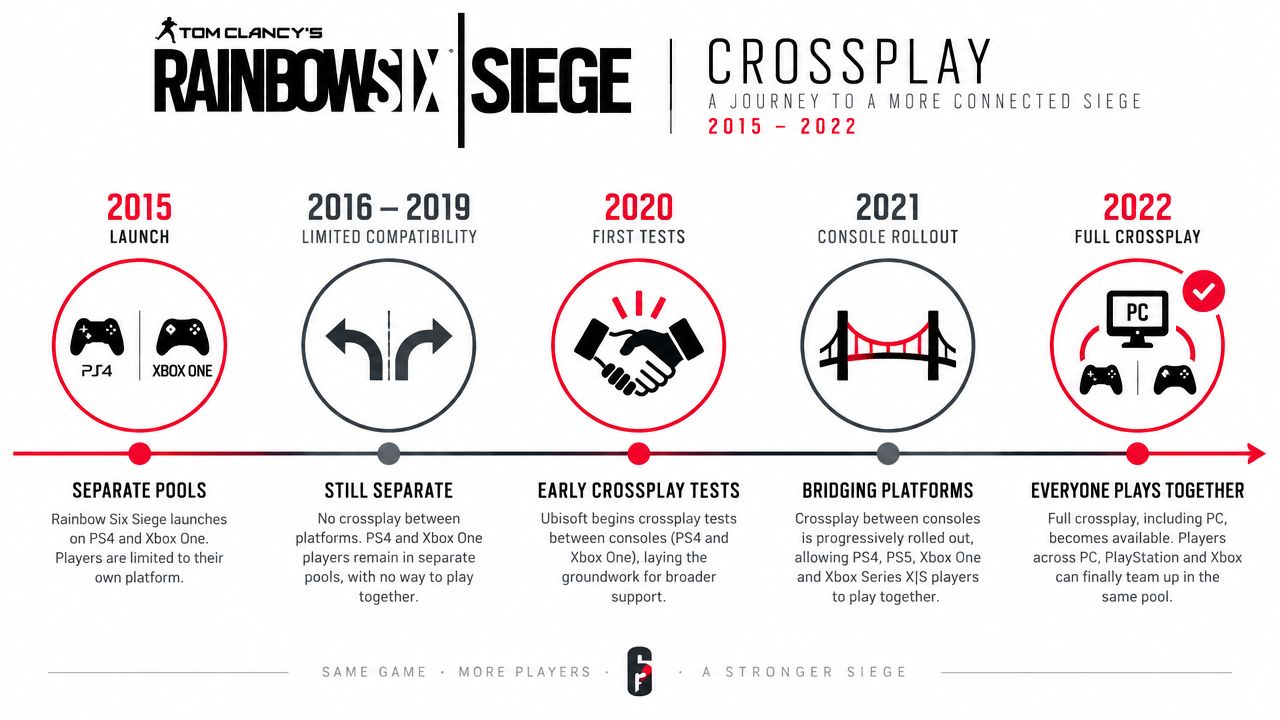
Siege did not turn on crossplay in one clean switch. It grew out of a game that kept each major platform in its own lane, which is why the rollout feels slower than in newer shooters. Siege launched on PS4, Windows, and Xbox One, and that starting point meant platform-separated matchmaking for a long stretch. Ubisoft had to widen the player pool without breaking the kind of 5v5 balance Siege depends on.
How the staged rollout unfolded
The rollout began on the PC side first. Ubisoft enabled crossplay and cross-progression for PC, Stadia, and Amazon Luna on June 30, 2021, then brought console crossplay later, in early December 2022, with Operation Solar Raid. That sequence matters because older advice about Siege crossplay often reflects an earlier version of the game, like a map callout from a patch that no longer exists.
Console grouping stayed tied to generation as the system expanded. PS5 matched with PS4, and Xbox Series X/S matched with Xbox One, instead of splitting into separate next-gen-only pools. That kept friends on different console generations in the same community rather than scattering them into smaller queues.
The timeline graphic captures that gradual shift clearly: first platform-by-platform support, then broader crossplay as the feature set matured.
Why the rollout felt slow
Siege could not treat cross-platform support like a social toggle. Every squad setup affects the match before the first round starts, and every input choice changes how fights play out once the action begins. Ubisoft was not just flipping a lobby switch, it was shaping account sync, platform pools, and input rules at the same time.
That is also why Siege's crossplay story pairs well with broader platform-convergence discussions, like this cloud gaming convergence explainer. The same idea shows up here in a more competitive form. Match access stays segmented, while cross-progression keeps your account history attached to you through Ubisoft Connect. Siege ends up feeling more careful than many shooters, but the structure is doing real work behind the scenes.
Understanding the Matchmaking Pool System
The cleanest way to think about Siege matchmaking is to picture the squad leader as the bouncer at the door. The leader doesn't just invite people into the party, the leader's Crossplay and Input Devices setting decides which room the whole squad gets sent to. Ubisoft says console players can be placed in either a PC-and-console pool or a console-only pool, and the squad leader's setting controls both the matchmaking pool and the allowed input devices for everyone in the party (Ubisoft's input and crossplay pool explanation).
Why the leader's input matters so much
If the leader is using mouse and keyboard, the squad can get pulled into the broader PC-and-console pool. If the leader is on controller, the squad stays in the console pool. That's the part many miss, because they assume each player carries their own setting into matchmaking. In Siege, the party inherits the leader's choice.
That's why mixed-input squads can feel so different from controller-only groups. A controller player joining a mouse-and-keyboard leader's party doesn't stay in a protected console lane. The whole squad gets sent to the pool that matches the leader's setup, and the lobby mix changes with it.
If your friend leads on keyboard, expect a very different night than if you lead on controller.
What lives in each pool
The console pool groups PS4, PS5, Xbox One, and Xbox Series X/S together. The PC pool includes the major PC clients, including Steam, Ubisoft Connect, and Luna. Ubisoft also gives PC players an escape hatch, they can opt out of crossplay and stay in a narrower pool if they want stricter boundaries.
| Siege Matchmaking Pools at a Glance | |||
|---|---|---|---|
| Squad Leader Input | Matchmaking Pool | Platforms Included | Can Join |
| Controller | Console pool | PS4, PS5, Xbox One, Xbox Series X/S | Console players in the same pool |
| Mouse and keyboard | PC-and-console pool | PC clients and console players who opt in | Mixed parties that fit the broader pool |
That table is the core of Siege cross-platform confusion. The account can be synced, the party can be legal, and the pool can still change because the leader used a different input. Once you see that, a lot of “why does this lobby feel weird?” complaints start making sense.
Enabling Crossplay on PC, PS5, and Xbox
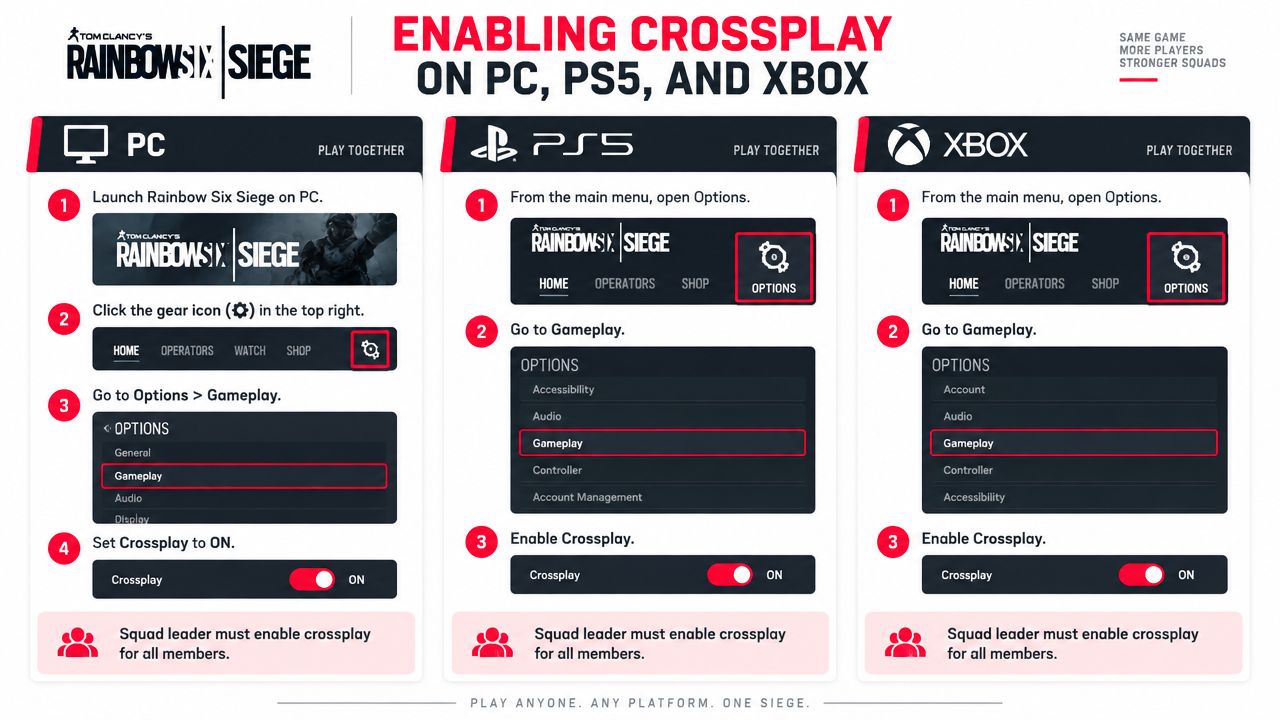
The settings menu is simple once you know what to look for, but Siege buries the important bit in the party logic. Turning crossplay on does not mean every lobby becomes universal. It means your account is allowed to participate in the relevant pool, while the leader's setting still decides where the squad lands.
On PC
Launch Siege, open the gear icon, then go to Options > Gameplay and switch Crossplay on. If the game shows a warning dialog, read it before you confirm, because that prompt is telling you you're about to enter the broader matchmaking setup rather than staying in a more limited lane.
If you turn it off, you're narrowing the pool again. That can make sense if you want to avoid mixed-platform matchmaking, but it also reduces who the squad can naturally pair with. The important thing is that the leader's choice still controls the final queue behavior.
On PS5
Use the Options button, open Settings, then go to Gameplay and enable Crossplay. Save the change, return to the main menu, and make sure the squad leader is the person whose setting you want to govern the party.
A controller-only squad will stay with other controller players in the console pool. If the leader is a keyboard player, the whole group can be pulled into the broader pool instead. That's the rule people learn the hard way after their first few ranked nights.
On Xbox
Press the Menu button, head to Settings, then open Gameplay and toggle Crossplay on. The confirmation works the same way as on PlayStation, and the same party logic applies once you queue.
The best quick check is the player list. Siege shows visual markers for cross-platform play, so you can confirm whether the lobby is using the setup you expected. If the icons don't match the kind of lobby you wanted, the answer is usually the same, the wrong person is leading.
Linking Ubisoft Connect for Cross Progression
Ubisoft Connect is the account layer that makes cross-progression work. If you want your Siege progress to follow you across platforms, the same Ubisoft Connect identity has to be linked everywhere you play. It keeps your account state in one place while the hardware changes.
How to set it up without breaking your account state
If you do not already have a Ubisoft Connect account, create one first. Then open Siege, go to Options > Account Linking, and connect the account on each platform you plan to use. Ubisoft's synchronization details explain that saved data is shared across platforms linked to the same Ubisoft Connect account.
That makes the account, not the console or PC, the center of your progression. Your progress can stay in sync, while match access still follows the pool rules discussed earlier.
What follows you and what doesn't
| Cross-Progression: What Carries Over vs What Stays Locked | ||
|---|---|---|
| Item Type | Cross-Platform | Notes |
| Rank and progression state | Yes | Follows the linked Ubisoft Connect account |
| Renown and battle pass progress | Yes | Shared across linked platforms |
| Available operators | Yes | Available wherever the account is linked |
| Cosmetics and alpha packs | Yes | Synced through account linkage |
| Platform-specific purchases | No | Stays tied to the storefront that sold it |
| Console storefront exclusives | No | Remains platform-locked |
| Platform-bound challenge progress | No | Does not automatically move with you |
The main caution is simple. Link the account before you settle on a main platform, and be careful about unlinking later. If you remove the bridge, some items can stay attached to the original platform context instead of moving cleanly with you.
Common Misconceptions About Cross Platform Play
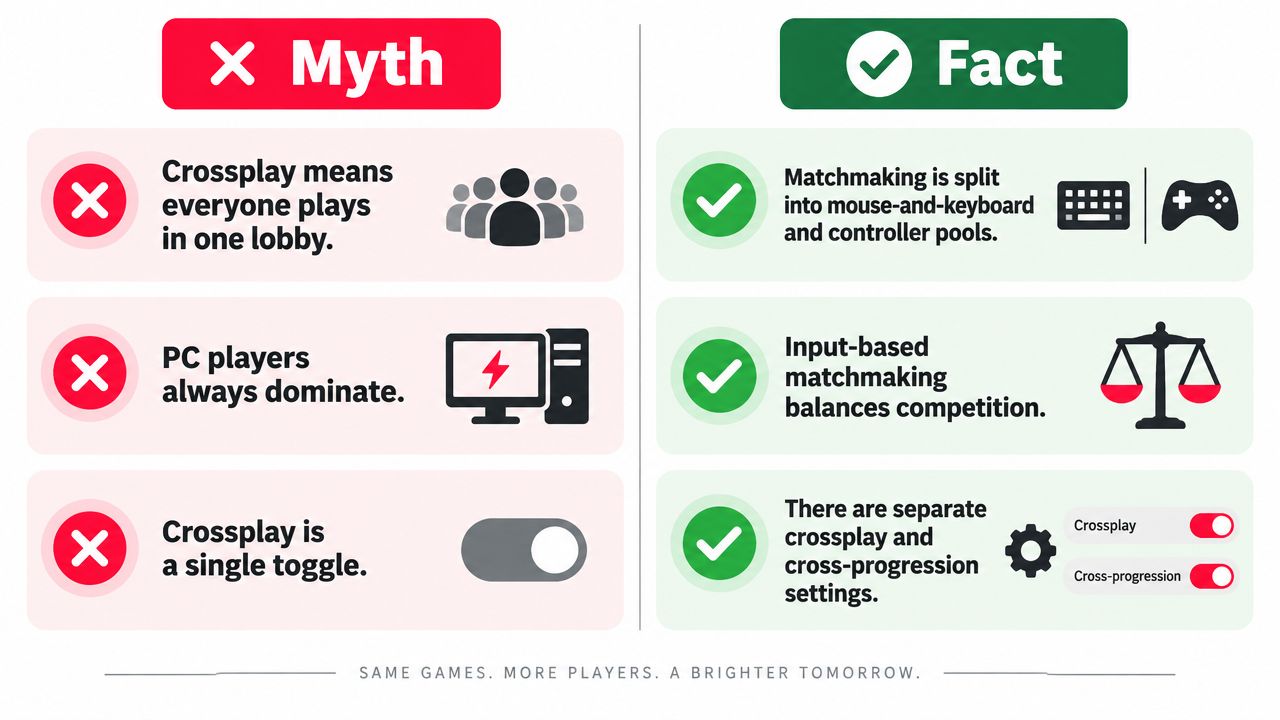
A lot of Siege confusion comes from people treating crossplay as a single switch that magically joins everyone together. That's not what's happening. Siege still separates players by matchmaking pool, and the pool can shift based on squad leader input.
The myths that trip people up
Myth one, “crossplay means everyone plays in one lobby.” False. Ubisoft splits matchmaking into controller and mouse-and-keyboard pools, and those pools only merge when the party setup calls for it.
Myth two, “PC and console ranked use the same pool.” False again. The account may carry progression across platforms, but match access is still segmented by the pool logic, so your rank history doesn't mean every queue behaves the same.
Myth three, “only PC can disable crossplay.” Also false. Console players can turn it off too and stay with same-input players in the narrower setup.
Myth four, “cross-progression automatically syncs purchases.” No. Cross-progression moves account state, but storefront-exclusive currencies and purchases stay tied to their original platform.
Short version: Siege cross-platform is not a universal lobby. It's a set of controlled lanes.
That's why people argue about whether Siege is “really” cross-platform when their actual problem is a lobby that doesn't match their expectations. The game is doing exactly what it was designed to do, it's just not doing the simple version that most players assume. Once you judge the feature by pool behavior instead of by the yes/no label, the confusion drops fast.
Building Cross Platform Squads That Actually Stick
If you're trying to make Siege cross-platform play feel stable, stop recruiting like every teammate is interchangeable. Start by testing people in casual or unranked first, then move them into ranked once you know who talks, who anchors, and who can survive a bad start without tilting. That saves everybody from discovering the wrong chemistry during a promotion series.
Habits that help mixed-input squads hold together
Run a backup voice channel like Discord, because in-game voice can feel fragmented once platform mixes get messy. Be explicit about input in the squad title, too, things like MnK, pad, or controller only are clearer than “need 2.” It sounds basic, but a lot of avoidable frustration comes from people assuming the lobby will sort itself out.
Good squads are built before the queue starts.
Role discipline matters as much as communication. A PC anchor who wants to hold site, a console flex who can swing off comms, and a roam player who understands when to slow down is a much cleaner mix than three people all trying to do the same job. If you want a place to find people who already filter by platform and play style, GamerPlug is one option for matching with teammates through profile-based discovery and squad listings, including across PC and console.
For a more general approach to picking reliable teammates and keeping a squad together, this guide to building the perfect gaming squad fits the same problem from a broader angle.
Cross-platform Siege works best when you treat it like team building, not matchmaking luck. Get the leader, the input mix, and the comms plan right first, then ranked stops feeling like a coin flip.
If you're still trying to find Siege teammates who fit your platform, input, and schedule, start with Gamerplug. It's built for players who want real squadmates instead of randoms, and it's useful when you need people who already understand cross-platform play before the first queue.
Built with the Outrank app